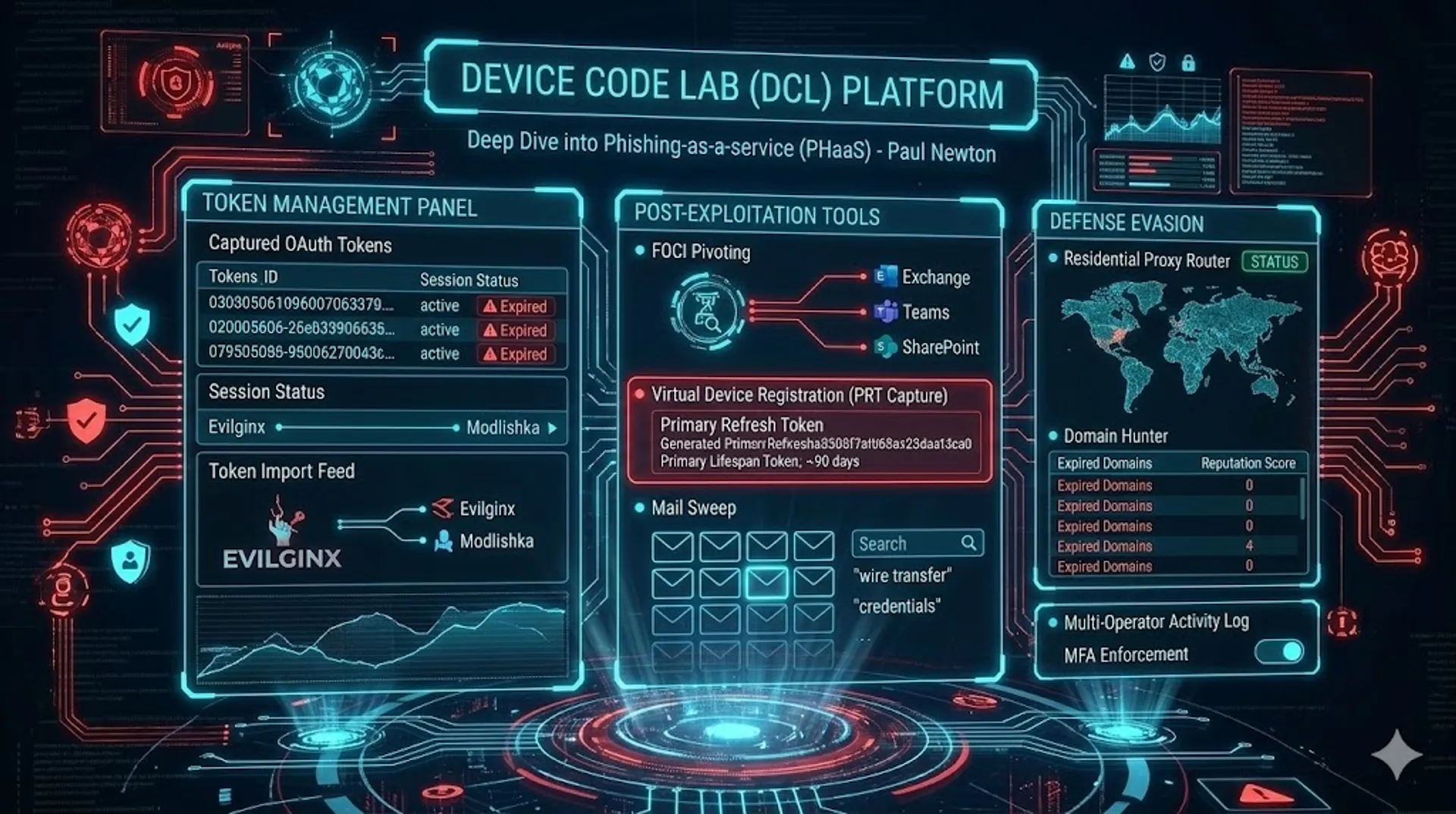
Device Code Lab (DCL) - Deep Dive into a Device Code Phishing Toolkit
A deep dive into Device Code Lab, a professional grade, device code phishing platform, with numerous defense evasion and post-exploitation features.
Intro
In my last post, I covered a novel front-end for Evilginx that I came across in the wild while hunting. A couple of weeks ago, while performing similar hunts, I came across a new panel hosting a login page on IP 192.3.225[.]100, with the title: “Device Code Lab”.
A quick intel search on the IP surfaced a post from Push Security and their in-depth research into different device code phish kits. The IP in this case matched infrastructure for one they had named “AUTHOV”.
As with my previous findings, much of the capabilities of the tooling is leaked in the UI code, and this one has some interesting features. In recent days, the FBI released an advisory PSA260521 on the uptake in a phish kit named Kali365 also abusing device code phishing, making this topic increasingly relevant.
With that in mind, in this post I’m going to do a deep dive on all the features of the Device Code Lab (aka Authov), its defense evasion and post exploitation capabilities.
High Level Overview
If you don’t want to read the full technical deep dive, the most interesting post-exploitation capabilities are:
- Token Import: The tool aggregates captures from multiple phishing frameworks. The code comment reads:
Import OAuth tokens captured by external tools (Evilginx post-conversion, Modlishka, etc.)- the support for other external tools is surprising, and shows the authors intent for this to be a centralised token management platform, not just a standalone phish kit. - FOCI Pivoting: Very common with these tools and similar token theft tools now. A single captured refresh token can be silently exchanged for access tokens to every Microsoft service - Exchange, Teams, SharePoint, Azure, Key Vault - without any further victim interaction.
- Domain Hunter: One of the more interesting features. Automated Expired Domain Sourcing is built into the platform, where expired domains are presented to operators, and a number of reputational checks are run against them to provide the best candidates for existing domain purchase for phishing campaigns.
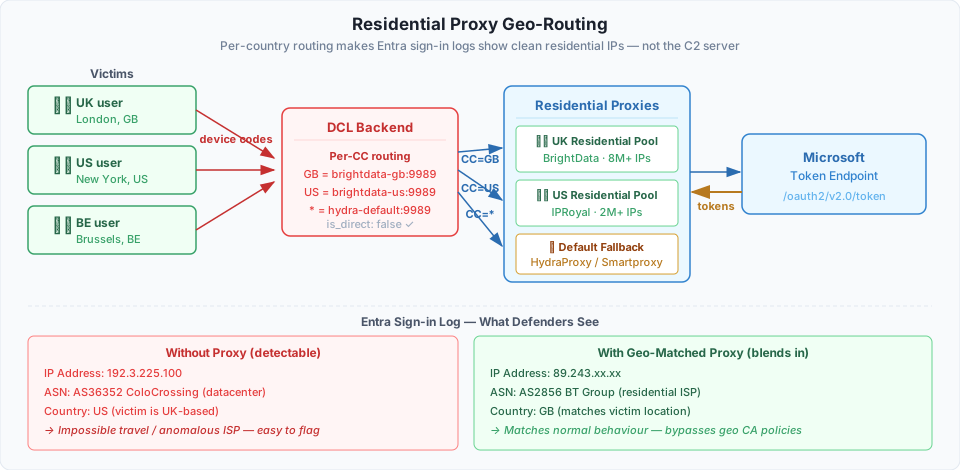
- Proxy Routing: The platform has built-in support for usage of residential proxies, to proxy traffic to Microsoft infrastructure through IPs which match the victims geography. This can bypass both conditional access controls based on geography, but more importantly can avoid impossible travel detections, as well as help authentications blend in to the victims normal authentication behavior. For me, this shows the authors awareness of defensive controls in Entra.
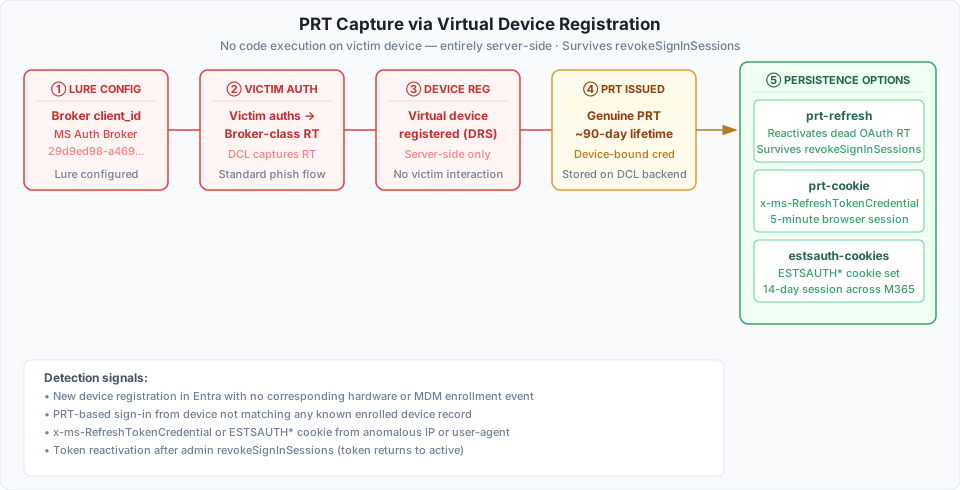
- PRT Capture via Virtual Device Registration: Using client_id
29d9ed98-a469-4536-ade2-f981bc1d605e(Microsoft Authentication Broker) in the lure, it produces a refresh token that can be used server-side to register an attacker-controlled virtual device against Entra ID. Microsoft then issues a genuine PRT (~90 days) against that virtual device. The PRT survives OAuth session revocation and can regenerate dead tokens, producex-ms-RefreshTokenCredentialcookies (valid for 5 min), and generate persistentESTSAUTH*session cookies (valid for 14 days). - Mail Sweep: Simultaneous queries search across every captured mailbox - operators can hunt for terms like “wire transfer”, “invoice”, or “credentials” across hundreds of victims in one query.
- MFA Enforcement: Turns out threat actors care about access security too. The platform has support for MFA for authentication into the platform.
- Multi-operator Support: The tool is designed for use by teams of operators, with role-based access control, activity logging, and token ownership attribution. With roles provided with different access scopes.
IOCs
IP Addresses
| IP | Associated Domain |
|---|---|
| 104[.]219[.]239[.]125 | api[.]controltkeusa[.]com |
| 172[.]81[.]130[.]130 | api[.]controltkeusa[.]com |
| 67[.]215[.]253[.]44 | api[.]babalfashion[.]com |
| 192[.]3[.]225[.]100 | api[.]skysharegroup[.]com |
| 104[.]21[.]78[.]8 | babalfashion[.]com |
| 172[.]67[.]214[.]105 | babalfashion[.]com |
| 104[.]21[.]85[.]226 | skysharegroup[.]com |
| 107[.]172[.]151[.]3 | kraftmansplay[.]com, new added 04th June |
Domains
- api[.]controltkeusa[.]com
- api[.]babalfashion[.]com
- api[.]skysharegroup[.]com
- api[.]kraftmansplay[.]com
- babalfashion[.]com
- skysharegroup[.]com
- kraftmansplay[.]com
API Endpoint Patterns
These URL path patterns are distinctive to DCL’s backend API. They are useful for hunting in proxy or web server access logs - particularly when investigating a suspected C2 server or reviewing egress from an infected host.
| Path Pattern | Description |
|---|---|
/api/tokens/{id}/capture-prt | PRT capture via virtual device registration |
/api/tokens/{id}/prt-refresh | PRT-based token reactivation after revocation |
/api/tokens/{id}/prt-cookie | x-ms-RefreshTokenCredential cookie generation |
/api/tokens/{id}/estsauth-cookies | 14-day ESTSAUTH session cookie generation |
/api/tokens/{id}/refresh-to-resource | FOCI cross-resource pivot |
/api/tokens/refresh-all | Bulk token refresh across all captured sessions |
/api/tokens/dedupe-archive | Deduplication of multi-capture accounts |
/api/tokens/import/txt | Bulk token import from Telegram notification format |
/api/tokens/{id}/message-search | Cross-mailbox KQL sweep |
/api/sessions | Device code session management |
/api/landing/deploy/cloudflare | Cloudflare Worker landing page deployment |
/api/cloaker/{id}/status | Redirector kill switch status poll |
/api/settings/hunter/vt-key | VirusTotal key configuration |
/api/settings/hunter/ed-creds | ExpiredDomains.net session credential storage |
/api/system/update | In-place platform self-update |
/api/health/diagnostics | Platform health check |
Detection Opportunities
Detection Hunts
First-Time Device Code Authentication hunt-2025-043
Flags successful device code authentications by users with no history of the protocol in the preceding 30 days - a strong behavioural indicator of phishing in environments where device code is rarely used legitimately.
FOCI Multi-Resource Token Exchange Burst hunt-2025-044
Detects a single FOCI-capable client_id exchanging a refresh token against three or more distinct resource endpoints within a 10-minute window - the direct post-exploitation signature of a captured token being pivoted across Microsoft services.
Device Code Auth Followed by FOCI Burst hunt-2025-045
Correlates a successful interactive device code authentication with a FOCI burst for the same user within 20 minutes, closing the loop between the phish event and the post-exploitation pivot. The highest-confidence signal for a completed device code token theft.

The above shows a case where several resources are accessed by the same client ID, in a short window of time, following a successful device code authentication.
1. Authentication & Session Management
1.1 Operator Login with TOTP 2FA
async function performLogin() {
  const r = await fetch("/api/auth/login", {
    method: "POST",
    body: JSON.stringify({ username, password, totp }),
  });
  if (r.status === 403 && data.detail.totp_required) {
    // Show TOTP input field
    return;
  }
  localStorage.setItem(LS_SESSION, data.access_token);
  localStorage.setItem(LS_ROLE, data.role || "admin");
}
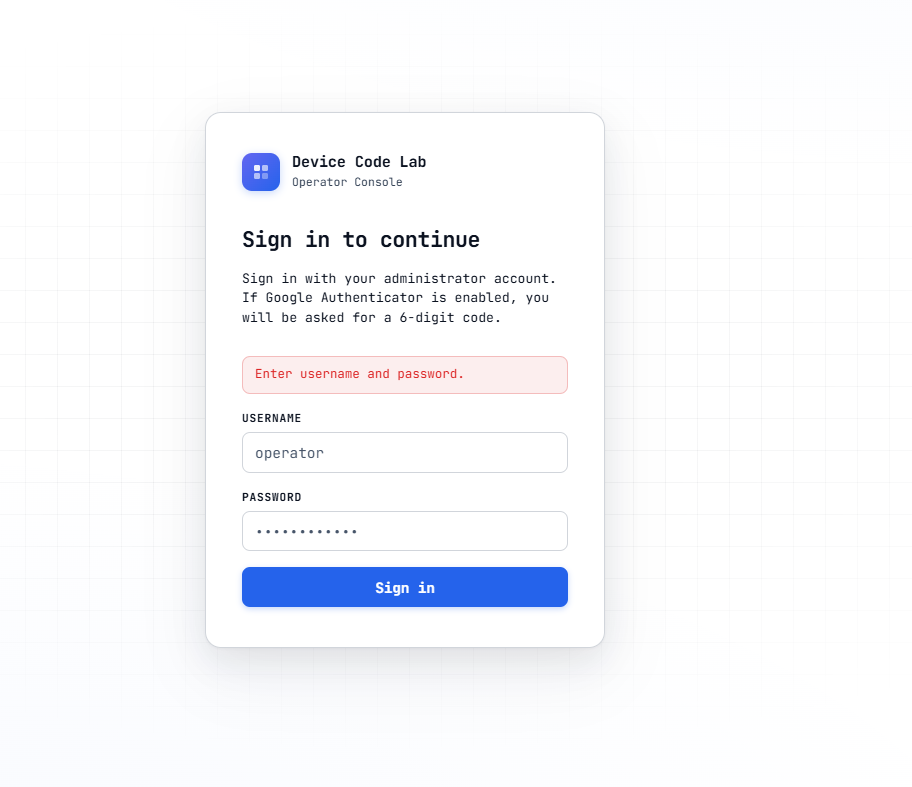
The platform protects its own operator accounts with TOTP (Google Authenticator). If the TOTP field is omitted, the server returns 403 with totp_required: true and surfaces the input. This is worth noting from a defensive standpoint: the attackers securing their infrastructure with 2FA while abusing the lack of phishing-resistant MFA on victim accounts.
2. Device Code Session Lifecycle
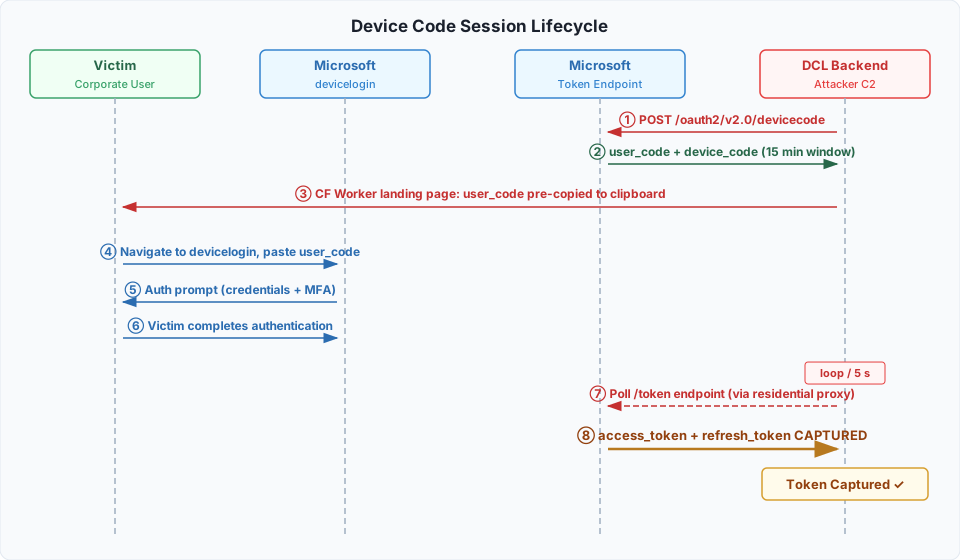
The victim-facing side of a device code phishing operation is handled by the phishing landing page - typically a Cloudflare Workers page, used heavily in device code phishing, (I covered this in a previous post); initial campaign post. That page calls the DCL backend to generate a device code, displays the user_code to the victim pre-copied to the clipboard, and opens a popup pointing to microsoft.com/devicelogin for the victim to paste it into.
From the operator’s perspective, when a new session is started, DCL calls Microsoft’s /oauth2/v2.0/devicecode endpoint to generate the code, then polls the token endpoint every few seconds in the background. The session resolves in one of two ways: the victim enters the code and Microsoft issues tokens - at which point DCL captures the full OAuth token set - or the 15-minute device code window expires and the session is abandoned.
DCL manages many of these sessions simultaneously, with per-session proxy routing, expiry tracking, and source attribution.
2.1 Starting a Session (with Proxy Selection)
$("start-session").addEventListener("click", async () => {
  const proxyId = proxySelect?.value ? parseInt(proxySelect.value) : null;
  const data = await api("/api/sessions", {
    method: "POST",
    body: JSON.stringify({ proxy_id: proxyId }),
  });
  // data = { session_id, user_code, verification_uri, expires_in, interval }
});
The proxy selection is important here. When the backend polls Microsoft’s token endpoint, it routes that traffic through the selected residential proxy. This means that from Microsoft’s perspective, the authorization request originates from a residential ISP in the chosen country - not from the attacker’s C2 server. We cover this in more detail in Section 6.
2.2 Source Attribution
Every session carries a source_tag so the operator knows exactly which delivery method produced each capture:
- Email delivery:
sender:from@attacker.com|to:victim@corp.com- links the captured token back to the specific phishing email sent - Landing page:
landingwithlanding_urlrecording the full URL the victim visited
Combined with proxy_egress_country and proxy_egress_ip, the operator has a full picture of where each token came from and through which proxy the authorization passed.
3. Token Capture & Management
Once a victim enters the device code, the backend receives a full OAuth token set from Microsoft - an access token (typically valid for 1 hour), and a refresh token (valid for 90 days, renewable indefinitely with use), and optionally an ID token. This is handled by the token management module and allows the post exploit pivots to begin.
3.1 Token State Model
let tokenStatusFilter = "active"; // active | inactive | all
let tokenShowDuplicates = false;   // collapse older captures of same account
const TOKEN_PAGE_SIZE = 15;
By default the view deduplicates by (email, tenant) - only the most recently captured token for each account is shown. If the same victim was phished twice (e.g. a second campaign after the first token expired), older captures are hidden behind a +N older badge. This keeps the operator’s working view clean when running high-volume campaigns.
3.2 Token Refresh with Failure Classification
Access tokens expire after an hour but refresh tokens can be exchanged for new access tokens indefinitely, as long as the refresh token itself remains valid. DCL automates this, and classifies failures so the operator knows whether to wait or re-phish:
try {
  const out = await api("/api/tokens/" + id + "/refresh", { method: "POST" });
} catch (e) {
  if (/marked inactive|inactive - re-capture|RT (?:exhausted|dead)/i.test(msg)) {
    reason = "Token RT permanently dead - re-capture required.";
  } else if (/transiently|transport|temporarily|server_error|503|504|timed out/i.test(msg)) {
    reason = "Refresh transiently failed - Microsoft unreachable or rate-limited. Will auto-retry.";
  } else if (msg.includes("PRT")) {
    reason = "PRT refresh failed - " + msg;
  }
}- Permanent failure - the refresh token has been revoked (admin action, password change, or Microsoft risk-based policy). The token is marked inactive. If a PRT was captured for this account, token resurrection (Section 5.2) can recover it.
- Transient failure - network issue or Microsoft rate limiting. The token stays active and the refresh will be retried automatically, so the operator doesn’t need to take action.
(I covered token theft and their life cycles in one of my previous posts)
3.3 Bulk Operations
When running campaigns with many victims, manual per-token management can be difficult to scale. DCL helps with this, by providing:
- Refresh all -
POST /api/tokens/refresh-all- sends a single request that refreshes every active token server-side and returns a summary of how many succeeded or failed - Dedupe archive -
POST /api/tokens/dedupe-archive- for every(email, tenant)pair with multiple captures, marks all but the newest as inactive and records how many accounts were affected
3.4 Token Import from External Tools
This element shows how DCL is not intended to be the only token capture mechanism, but rather a multi-functional token management platform:
// 1. Single token (JSON fields)
const tokens = [{
  email, tenant_hint, scope,
  access_token, refresh_token, id_token, note
}];

// 2. Bulk JSON array - up to 500 tokens
const tokens = JSON.parse(raw);

// 3. .txt file - Telegram notification format (paste from bot messages)
const formData = new FormData();
formData.append("file", fileInput.files[0]);
await fetch("/api/tokens/import/txt", { method: "POST", body: formData });
The code comment explicitly lists Evilginx post-conversion and Modlishka as sources. Tokens from adversary-in-the-middle phishing (which captures session cookies, not OAuth tokens) can be converted and imported here. The optional validate_live: true flag tests each imported token against Microsoft Graph before saving, so the operator immediately knows which imports are still viable.
3.5 Background Expiry Polling (Soft Refresh)
Every 30 seconds, a lightweight poll updates token_expires_at and is_active on each token card without re-rendering the list. This is specifically designed to preserve the operator’s scroll position and any open menus while keeping expiry countdowns accurate:
const fresh = await api("/api/tokens?active_only=" + activeOnly + "&dedupe=" + dedupe);
if (t.is_active && t.token_expires_at) {
  const diffMin = Math.floor((new Date(t.token_expires_at) - serverNow()) / 60000);
  if (diffMin <= 0)       ns = "active";  // AT expired but RT valid - auto-renews on next use
  else if (diffMin <= 10) ns = "warn";
  else                    ns = "active";
}
Note the diffMin <= 0 → "active" case: an access token that has expired but whose refresh token is still valid is shown as active, not expired. The backend will silently exchange the RT for a fresh AT on the next API call. From the operator’s perspective, the token is always usable.
4. FOCI (Family of Client IDs) Resource Pivoting
FOCI is one of the powerful post-exploitation features in the tool. The abuse of Microsoft’s Family of Client IDs is not new, and becoming increasingly common in these token based attacks.
At a high level, Microsoft groups certain first-party applications - the Windows broker, Office apps, Teams, Azure CLI - into a “family”. Any refresh token obtained via a family member client can be exchanged for an access token scoped to any other service, without re-authenticating. It also means that a single device-code phish, using the right client_id, gives the attacker silent access to every Microsoft service the victim has access to.
const FOCI_RESOURCES = [
  { name: "Microsoft Graph",    resource: "https://graph.microsoft.com/",    note: "already-stored" },
  { name: "Exchange / Outlook", resource: "https://outlook.office365.com/",   note: "already-stored" },
  { name: "OneDrive Files",     resource: "https://graph.microsoft.com/",    note: "via-graph" },
  { name: "MS Teams",           resource: "https://api.spaces.skype.com/",    note: "auto" },
  { name: "Azure Management",   resource: "https://management.azure.com/",   note: "refresh" },
  { name: "Azure Key Vault",    resource: "https://vault.azure.net/",         note: "refresh" },
  { name: "Office Management",  resource: "https://manage.office.com/",      note: "refresh" },
  // ...
];
The pivot is a single API call:
const result = await api("/api/tokens/" + tid + "/refresh-to-resource", {
  method: "POST",
  body: JSON.stringify({ resource }),
});
_resTokenMap[tid][resource] = result.access_token;
The note field tells the operator what action is required:
"already-stored"- Graph and Exchange access tokens were obtained during the initial device-code flow; no action needed"via-graph"- OneDrive is accessed through the Graph API, so the already-stored Graph token covers it"auto"- Teams tokens are refreshed automatically by the backend on a schedule"refresh"- the operator needs to click once to pivot the refresh token to this resource (Azure Management, Key Vault, etc.)
In practice this means: phish one user → one click per additional resource → the operator now has access to the victim’s email, files, Teams messages, Azure subscriptions, and Key Vault secrets. No additional interaction from the victim.
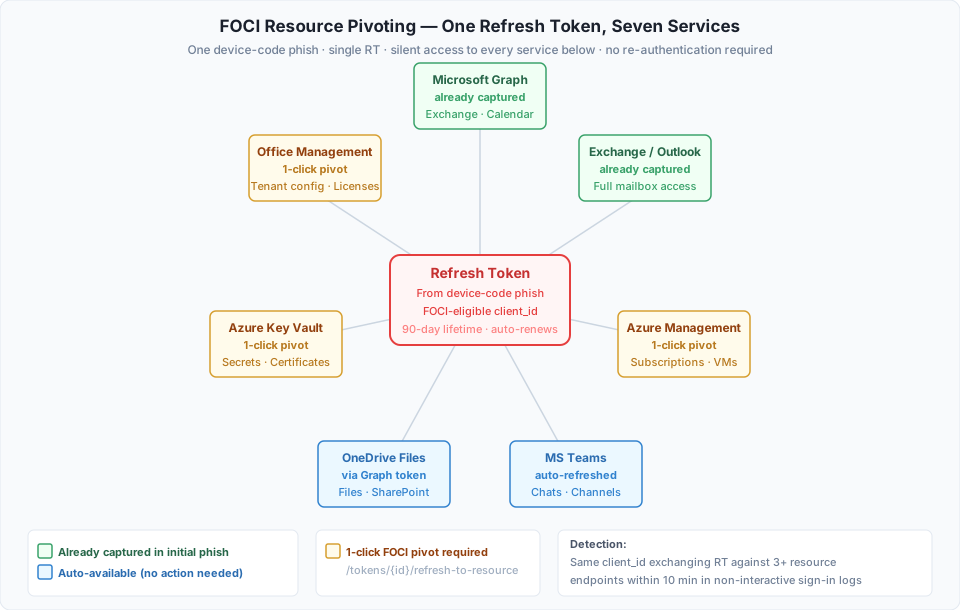
Detection: Non-interactive sign-in logs showing the same client_id and refresh_token fingerprint exchanged against multiple resource endpoints within a short window. This pattern is anomalous for legitimate first-party app behaviour.
5. PRT Capture via Virtual Device Registration
Note: This section is an assumption based on the frontend UI code, but can not be confirmed without backend code.
DCL’s “PRT operations” appear to implement real PRT capture via virtual device registration - not by extracting a device-bound credential from the victim’s machine which is stored in a device TPM. The technique exploits a specific Microsoft auth flow documented by Dirk-jan Mollema in Phishing for Microsoft Entra Primary Refresh Tokens and implemented in his roadtx.
The key insight is that upgrading from a standard refresh token to a PRT is not universally possible - it requires the initial sign-in to have used a specific client_id. As Mollema documents: “Windows uses the client ID 29d9ed98-a469-4536-ade2-f981bc1d605e (Microsoft Authentication Broker) and resource https://enrollment.manage.microsoft.com/ for this request.” This is consistent with DCL requiring a broker client to be configured in the lure settings before PRT capture becomes available in the UI.
The inferred chain, server-side - no code execution on the victim device:
- The lure uses client_id
29d9ed98-a469-4536-ade2-f981bc1d605escoped to the Device Registration Service resourcehttps://enrollment.manage.microsoft.com/ - Victim authenticates → DCL backend receives a broker-class refresh token
- DCL calls
capture-prt: the backend likely uses the RT to register an attacker-controlled virtual device against Entra ID (equivalent toroadtx regdevice) - Using the virtual device certificate + phished RT, Microsoft issues a genuine PRT (~90 day lifetime)
- The PRT is stored server-side on the DCL backend
If this mechanism is implemented as the UI suggests, the attacker holds a credential that Microsoft treats identically to a PRT issued to a real enrolled Windows device. This technique was covered by Elastic Security Labs.
5.1 PRT Capture
const out = await api("/api/tokens/" + id + "/capture-prt", { method: "POST" });
// Success → token gets prt_captured_at timestamp
// Requires broker client_id 29d9ed98-a469-4536-ade2-f981bc1d605e in lure settings
// Backend registers a virtual device and mints a PRT against Microsoft's DRS
The “Capture PRT” button only appears on tokens that are currently active and where a PRT has not yet been captured. Once successful, it is replaced by “Browser Login” and “PRT Refresh” - meaning the window to capture is while the original OAuth token is still live.
5.2 PRT-Based Token Reactivation
Because the captured credential is a genuine PRT with its own ~90 day lifetime, it has different revocation requirements from a standard OAuth refresh token. Microsoft’s revokeSignInSessions action - the “Revoke all sessions” button in the Entra ID portal - primarily invalidates OAuth refresh tokens. PRT revocation follows a separate path, evaluated at device compliance check intervals or via Conditional Access.
In practice: an admin revokes all sessions, the OAuth RT is killed, the token shows as inactive in DCL. The operator clicks “PRT Refresh”:
const out = await api("/api/tokens/" + id + "/prt-refresh", { method: "POST" });
if (out.ok) {
  // out.refresh_token_obtained = true → fresh OAuth RT obtained from PRT
  // out.reactivated = true → token RE-ACTIVATED ✓
}
The token returns to active. This reactivation and the PRT does not survive account disablement, removal of the virtual device from Entra ID, or Conditional Access policies enforcing real-time token binding - but it does provide a meaningful persistence window against the most common first-line IR action.
5.3 x-ms-RefreshTokenCredential Cookie Injection (5-Minute Window)
DCL’s backend uses the broker refresh token to call Microsoft’s auth endpoints server-side, constructing a signed x-ms-RefreshTokenCredential JWT. The operator is then offered two injection methods via tabs in the UI:
const out = await api("/api/tokens/" + id + "/prt-cookie", { method: "POST" });
// out.cookie_value  = raw x-ms-RefreshTokenCredential JWT value
// out.console_script = JS one-liner for console injection (recommended)
Option 1 - Console Script (recommended): Open an incognito window, navigate to login.microsoftonline.com, open DevTools Console, paste the generated script, and press Enter. The script sets the cookie on that domain and immediately redirects to myapps.microsoft.com, signing the browser in as the victim.
Option 2 - DevTools Manual: Open DevTools → Application → Cookies → +, create a cookie named x-ms-RefreshTokenCredential with domain .login.microsoftonline.com and path /, paste the value, then navigate to myapps.microsoft.com.
Both require navigating to login.microsoftonline.com first - the cookie must be set on that domain to be picked up during authentication. The credential is valid for approximately 5 minutes.
5.4 ESTSAUTH 14-Day Session Cookies
For longer-lived browser access, DCL runs the full broker auth cycle entirely server-side - the backend generates the x-ms-RefreshTokenCredential, submits it to Microsoft’s auth endpoints, and harvests the resulting session cookies directly. The operator injects them via the same console script approach:
const out = await api("/api/tokens/" + id + "/estsauth-cookies", { method: "POST" });
// Takes ~10 seconds - server runs the full authorize flow against Microsoft
// out.console_script sets ESTSAUTHPERSISTENT, ESTSAUTH, ESTSAUTHLIGHT
// Valid ~14 days across Outlook, Teams, SharePoint, Exchange admin, Azure
Incognito window → login.microsoftonline.com → Console → paste script → Enter. The script sets all three ESTSAUTH* cookies and redirects to myapps.microsoft.com. Unlike the 5-minute PRT cookie, these survive browser restarts with no active countdown - the session simply remains valid for approximately 14 days.
Detection: x-ms-RefreshTokenCredential appearing on login.microsoftonline.com from a non-Windows user agent or an IP inconsistent with the user’s normal sign-in pattern. ESTSAUTH* cookies appearing from a device with no matching enrolled device record in Entra ID.
6. Residential Proxy Infrastructure
Many enterprise tenants increasingly deploy Conditional Access Policies that block sign-ins from unexpected countries or ISP types. A sign-in from a datacenter IP in the Netherlands for a user who always authenticates from London will be flagged as suspicious. DCL addresses this with per-country residential proxy routing.
6.1 Per-Country URL Map (Wire Format)
The backend stores proxy routing as a CC = URL plaintext map:
function _parseProxyMapWire(raw) {
  const out = [];
  const re = /^\s*([A-Za-z*]+)\s*=?\s*(https?:\/\/\S.*)$/;
  raw.split("\n").forEach(line => {
    let key = m[1].toUpperCase();
    if (key === "*" || key === "ANY" || key === "FALLBACK") key = "DEFAULT";
    if (key !== "DEFAULT") key = key.slice(0, 2); // ISO-2 only
    out.push({ cc: key, url: m[2] });
  });
  return out;
}
This means the operator can define, for example: route all Belgian victim sessions through a Belgian residential proxy, UK victims through a UK proxy, and everything else through a US default. When the device-code poller calls Microsoft’s token endpoint, it exits through the proxy matching the victim’s country code - from Entra ID’s sign-in log, the authentication appears to originate from a residential IP in the correct geography. This shows an awareness of defensive controls in Entra, and user behavioral analytics by the attacker.
The resolve preview endpoint lets the operator test their routing before a campaign:
const r = await api("/api/proxy/resolve-preview?cc=BE");
// r = { resolved_cc: "BE", source: "map[BE]", chosen_url_masked: "...", is_direct: false }
is_direct: false confirms the poll will route through a proxy and not expose the C2 server IP.
6.2 Saving Proxy Configuration
// Base URL with {cc} placeholder - a single provider with per-country endpoints:
await api("/api/settings/lab", {
  method: "PUT",
  body: JSON.stringify({ proxy_url: "http://user:pass@gate.brightdata.com:9989-country-{cc}" }),
});

// Per-country map - different proxy providers per region:
await api("/api/settings/lab", {
  method: "PUT",
  body: JSON.stringify({ proxy_url_map: "US = http://user:p@us.hydra.com:9989\nGB = http://user:p@gb.hydra.com:9989" }),
});
The supported providers listed in the code are HydraProxy, BrightData, IPRoyal, Smartproxy, and Oxylabs - all commercial residential proxy networks that provide per-country egress.
6.3 The Proxy Problem
From a detection standpoint, detecting authentications from residential proxies is particularly difficult. With no fixed ASN, IP churn in the proxies, usage of residential ISPs, and a high number of IPs in the proxies. There is however some detection methods we can employ, I will cover those however in my next post, as this one is already getting long!
- Oxylabs - 10,000,00+ IPs
- BrightData (AKA Luminati) 8,000,000+ IPs
- IPRoyal 2,000,000+ IPs
- SmartProxy - Oxylabs reseller
- HydraProxy - Unknown
7. Mail Sweep - Cross-Mailbox Bulk Search
Once an operator has captured tokens for many victims, individual mailbox browsing doesn’t scale. The Mail Sweep module runs a single query against every captured mailbox simultaneously, returning matching emails across all victims in one view. The obvious use cases: BEC fraud (search for “invoice”, “wire transfer”, “payment”), credential harvesting (search for “password reset”), or intelligence gathering on a target organisation.
function Semaphore(n) {
  let c = 0, q = [];
  return {
    acquire() { return new Promise(r => { if (c < n) { c++; r(); } else q.push(r); }); },
    release() { c--; if (q.length) { c++; q.shift()(); } }
  };
}
const sem = Semaphore(4);
7.1 Query Building & Execution
const tokens = await sweepFetch("/api/tokens?active_only=true&dedupe=true");
const tasks = tokens.map(async (tok) => {
  await sem.acquire();
  try {
    // GET /api/tokens/{id}/message-search?q=wire+transfer&has_attachments=true&top=25
    const data = await sweepFetch(buildQS(filters, tok.id));
    const msgs = (data && data.value) || [];
    // Tag each result with its source token for attribution
    appendGroup({ tokenId: tok.id, rows: msgs.map(m => ({ ...m, _tokenId: tok.id, _email: tok.email })) });
  } catch(e) {
    _sweepErrors.push({ tokenId: tok.id, email: tok.email, message: e.message });
  } finally { sem.release(); }
});
await Promise.all(tasks);
The filter parameters above are sent to DCL’s backend, which translates them into Microsoft Graph API $search queries using Exchange’s Keyword Query Language syntax - from:, to:, cc:, bcc:, subject:, body:, hasattachment:, received:, date ranges, quoted phrases. The dedupe=true parameter ensures the same inbox isn’t searched twice if the operator holds multiple tokens for the same account.
7.2 Email Preview - Operator OPSEC
When the operator opens an email in the preview pane, DCL strips all remote resources before rendering:
function _stripRemoteAssets(doc) {
  // Remove <script>, <iframe>, <object>, <embed>, <video>, <audio>
  // Replace <img> with "[image blocked: alt]" (alt truncated to 32 chars)
  // Strip CSS url() and @import directives
  // Kill inline style url()/expression()/behavior()
  // Remove <meta http-equiv="refresh">
}
This is followed by a strict CSP injected into the preview iframe:
<meta http-equiv="Content-Security-Policy"
      content="default-src 'none'; img-src data:; style-src 'unsafe-inline'; ...">
8. Mailbox Address Extraction (Streaming)
Where Mail Sweep searches for specific content, the Address Extractor harvests every email address that appears anywhere in a victim’s mailbox - in the To, From, CC, and BCC fields of every message in every folder. The output feeds directly into the Sorter and Debounce modules for validation and secondary targeting.
8.1 Results & Downstream Targeting
The results view breaks down extracted addresses by domain - making it trivial to identify colleagues, partners, and vendors of the victim. A “Send to Sorter” button passes the full address list to DCL’s email validation module, which verifies which addresses are deliverable before the next phishing campaign targeting them. This creates a tightly integrated pipeline: phish one person → extract their contact network → validate addresses → send the next wave.
9. Entra ID Role Enumeration
After capturing a token, DCL queries the victim’s directory roles via the Graph API and surfaces the results as badges on the token card:
async function loadTokenRoles(tokenId) {
  const data = await api("/api/tokens/" + tokenId + "/roles");
  const cached = tokenCache.find(t => t.id === tokenId);
  if (cached) cached.roles = data.roles;
  renderTokenTable();
}
Priority roles flagged in the UI (by Entra template ID):
62e90394-69f5-4237-9190-012177145e10→ Global Admin - full tenant control29232cdf-9323-42fd-aea2-88b05641c781→ Exchange Admin - full mailbox access, mail flow rules, transport rules194ae4cb-b126-40b2-bd5b-6091b380977d→ Security Admin - can modify security policies, Defender settings, Conditional Access
With higher privileged roles flagged to the operator for most impact.
The code also flags FOCI eligibility (is_foci_eligible) and PRT capture status (prt_captured_at) directly on each token card, giving the operator a single-glance summary of what post-exploitation options are available for each victim.
10. Cloudflare Worker Deployment
DCL deploys its phishing landing pages as Cloudflare Workers via the Cloudflare REST API. Cloudflare workers (workers.dev) have been a trademark of device code phishing campaigns in recent months:
// Auto-fetch Account ID from email + API key
const r = await api("/api/settings/cloudflare/auto-account-id");

// Deploy landing page as Worker
const j = await api("/api/landing/deploy/cloudflare", {
  method: "POST",
  body: JSON.stringify({ slug: "my-theme", public_backend_url: "https://api.example.com" }),
});
// j.worker_url = "https://my-theme.workers.dev"
11. Telegram C2 Notifications
await api("/api/settings/lab", { method: "PUT", body: JSON.stringify({
  telegram_bot_token: "123456:ABC-...",
  telegram_chat_id: "-1001234567890"  // or comma-separated for multiple groups
}) });
When a device-code session completes and a token is captured, the Telegram bot fires a message with the token ID, session ID, victim email, and tenant. This can allow for operators to be notified of high value victims while away from the portal.
12. Domain Hunter - Automated Expired Domain Sourcing
The inclusion of a domain sourcing and vetting module to support phish campaigns is one of the more interesting features of the tool. It sources expired and aged domains for acquisition for use in phishing campaigns.
12.1 Domain Sourcing: ExpiredDomains.net Authenticated Scraping
The primary source is ExpiredDomains.net, a marketplace aggregating recently expired and soon-to-expire domains across all TLDs. Anonymous access to the site is limited; DCL scrapes it using the operator’s authenticated session cookie, which unlocks the full filtered search results.
12.2 The Scoring Pipeline
Each candidate domain is run through a multi-source scoring pipeline before being surfaced to the operator. The composite score draws from four independent sources:
| Source | What It Checks | Contribution | Fallback If Key Missing |
|---|---|---|---|
| VirusTotal | Historical detection count, domain category, Alexa/Cisco ranking data | Up to 25 pts | 12/25 neutral score - domain is not penalised |
| Google Safe Browsing | Active blacklist status | Pass/fail gate | URLHaus only |
| PhishTank | Known phishing URL database | Pass/fail gate | OpenPhish only |
| Wayback Machine | Earliest archive snapshot date, historical content category | Age-weighted bonus | Always available, no key required |
The VT fallback score of 12/25 is deliberately neutral. A domain with no VirusTotal history is not penalised into “bad” territory, but it also doesn’t earn the bonus points that a clean, well-aged, and correctly-categorised domain accumulates. This models realistic uncertainty - many legitimate expired domains simply have no VT footprint.
The GSB and PhishTank fallbacks mean the pipeline degrades gracefully. Operators without API keys still receive scored results, just with less signal. When GSB is absent, URLHaus (which tracks malware distribution and phishing URLs) provides a floor-level blacklist check. When PhishTank is absent, OpenPhish (an open-source phishing feed) substitutes. Neither fallback matches the coverage of the primary sources, but they prevent the pipeline from producing completely unvetted output.
12.3 Credential Configuration
// VirusTotal API key (free tier supported for low-volume hunting)
await api("/api/settings/hunter/vt-key", {
  method: "PUT",
  body: JSON.stringify({ value: vtKey })
});

// PhishTank API key (fallback: OpenPhish only)
await api("/api/settings/hunter/phishtank-key", {
  method: "PUT",
  body: JSON.stringify({ value: ptKey })
});

// ExpiredDomains.net session (cookie + UA + pre-filtered search URL)
await api("/api/settings/hunter/ed-creds", {
  method: "PUT",
  body: JSON.stringify({ cookie: edCookie, user_agent: edUa, url: edUrl })
});
All keys and session credentials are stored Fernet-encrypted at rest, the same scheme used for OAuth tokens and the Telegram bot token.
12.4 Scoring Tuning
The pipeline exposes a set of tuning parameters that let operators calibrate what counts as a usable domain for their specific campaign profile:
| Parameter | What It Controls |
|---|---|
scan_interval_hours | How often the scraper runs and feeds new candidates into the pipeline |
min_display_score | Domains scoring below this threshold are hidden from the operator’s view entirely |
grade_a_score | Minimum composite score required for Grade-A classification |
grade_a_min_age_years | Minimum domain age (by earliest Wayback snapshot) for Grade-A eligibility |
claim_limit | Maximum number of domains a single operator can hold claimed at once |
claim_hold_hours | How long a claimed domain is reserved before it releases back to the pool |
batch_size | Number of candidate domains fetched from ExpiredDomains.net per scrape run |
grade_a_min_age_years is the most operationally significant of these. Domain age is often a signal of trust, particular on email gateways. An aged domain is more likely to pass through filters, than a newly registered domain. This again highlights the authors understanding of defensive controls.
12.5 Grade-A Classification and the Claim System
Domains meeting both the composite score and age thresholds receive a Grade-A classification - the platform’s designation for infrastructure ready to deploy into a campaign without further vetting. Lower-scored domains remain visible in the UI for operators willing to accept more risk.
12.6 Why This Is Operationally Significant
Most phishing kits and PhaaS platforms leave infrastructure sourcing entirely to the operator. The operator is expected to find domains separately - using dedicated services, manual searches, or their own tooling - before they can use the kit. DCL’s Domain Hunter eliminates that gap. From first login to a claimed, scored, campaign-ready domain, the entire sourcing workflow runs within the console.
Combined with Cloudflare Worker deployment (Section 10) and the anti-analysis redirector (Section 13), the complete infrastructure pipeline - domain sourcing → landing page deployment → traffic cloaking - is handled end-to-end without the operator needing external tooling. This lowers the barrier of entry to would be operators, and means even low skilled operators can perform sophisticated campaigns.
13. Anti-Analysis (Redirector/Cloaker)
The PHP redirector sits in front of the landing page and gates access based on visitor profile. Its purpose is to show the phishing page only to genuine victims, and serve a benign decoy to everything else - security researchers, automated scanners, and enterprise proxies.
13.1 IP Reputation Gating (ip-api.com)
$url = HIGH_TRAFFIC_MODE ? "https://pro.ip-api.com/json/{$ip}?key={PRO_KEY}"
                         : "http://ip-api.com/json/{$ip}";
$data = json_decode(file_get_contents($url));
$is_bad = in_array($data->proxy, ['vpn','tor','hosting']);
Visitors from datacenter IPs, VPNs, and Tor exit nodes are blocked - the population most likely to be security researchers or automated analysis. Residential IPs pass through. Results are cached in APCu for 30 minutes per IP to reduce API costs and latency.
13.2 HMAC Fingerprint Challenge
Rather than a simple CAPTCHA, the redirector presents an invisible challenge. The server embeds a signed nonce in the challenge page; the client-side JavaScript collects browser fingerprint data and POSTs it back with that nonce. The HMAC signature on the nonce prevents an attacker from replaying a known-good fingerprint response, each challenge is one-time. Bots that don’t execute JavaScript, or that try to pass static responses, are rejected.
A bug in this implementation was found and patched - see Section 16. The changelog noted that anyone could POST bot_score=100 directly to /check and receive a valid human cookie, bypassing the challenge entirely.
14. Operator Management & Token Sharing
14.1 Sub-Operator Creation
await api("/api/operators", {
  method: "POST",
  body: JSON.stringify({ username: uname, password: pw }),
});
Passwords are stored with bcrypt. Sub-operators cannot create further accounts - the privilege hierarchy is flat: one admin, N sub-operators.
14.2 Token Sharing
await api("/api/tokens/" + tokenId + "/share", {
  method: "POST",
  body: JSON.stringify({ operator_id: opId }),
});
A captured token can be shared with a specific sub-operator, who then sees it in their own token list and can run post-exploitation operations against it. The admin retains the ability to revoke the share at any time.
14.3 Role Gating in UI
function _applyRoleGating() {
  const viewerOnly = new Set(["nav-tokens", "nav-mailbox"]);
  document.querySelectorAll("#main-nav button").forEach(btn => {
    if (!isAdmin && !viewerOnly.has(btn.id)) btn.style.display = "none";
  });
}
Sub-operators see only “Tokens” and “Mailbox” - all infrastructure management (landing page deployment, proxy configuration, SMTP settings, Cloudflare credentials) is hidden. They can use captured access but cannot modify the platform’s infrastructure or see its configuration.
15. Health Diagnostics
const d = await api("/api/health/diagnostics");
// d.checks includes: Database, Telegram bot, encryption key, proxy connectivity, CF credentials
A diagnostics panel provides a quick checklist of all critical components. This is a production-grade feature that suggests DCL is operated as a long-running service rather than a per-campaign tool.
16. Changelog
The platform ships a built-in changelog page - 43 entries across features, bug fixes, security patches, and performance work in the version reviewed, covering three days in April 2026. The volume and the fact it exists at all as a polished UI feature (category filters, summary stats, re-deploy indicators) signals active professional development and a distribution model where operators receive the platform without direct codebase access.
The security fixes are worth a brief note: a sub-operator TOTP bypass (password-only login was possible despite 2FA being enabled) and a fully client-controlled anti-bot score (operators could POST bot_score=100 to skip the fingerprint challenge entirely) were both patched in this version, indicating they existed in earlier deployments.
Conclusion
This brings this post to an end. The main takeaway for me is the level of thought and development that has gone into this tool. As I discussed in my previous post, the surge in AI development, has cut dev time down significantly. In the past, a tool like this would take months of dev work, and from a threat actors perspective, would not be worth it. With the help of AI, a single author can build a production grade tool in a few weeks. This means that the useability of a tools like this are more considered, lowering the barrier of skill for operators, opening the door for less skilled actors, and giving greater efficiency to skilled actors. All this together means we can expect to see an increase of tools and campaigns of this nature.