Hunting New C2 Frameworks
A look at hunting C2 frameworks in the wild, including identifying a previously unknown C2 framework.
Introduction
Many years ago when I first started exploring Cyber Security as a career option, one of the things that fascinated me into the field was malware and their respective command servers. The thought of an attacker having remote access to my machine, being able to control it and steal data from it was intriguing, while also slightly terrifying. Cyber Security and the threat landscape has come a long way since then. Particularly in the last 18 months, with the boom of AI, both defenders and attackers’ capabilities have greatly evolved through the use of AI. It is now possible for an attacker to use AI to create their own C2 framework. In the past, creating a C2 framework would require a lot of time and effort, but now with the help of AI it can be done in a matter of hours. In this blog, I’m going to take a quick look at some new C2 frameworks found in the wild, as well as introduce C2-hunter, a new side project I’ve been working on to track both established and new C2 servers in the wild.
ZShell
During my hunting, I came across a couple of IPs hosting an unknown C2 panel named ZShell. The login page contains Chinese characters, suggesting a Chinese origin for the framework.
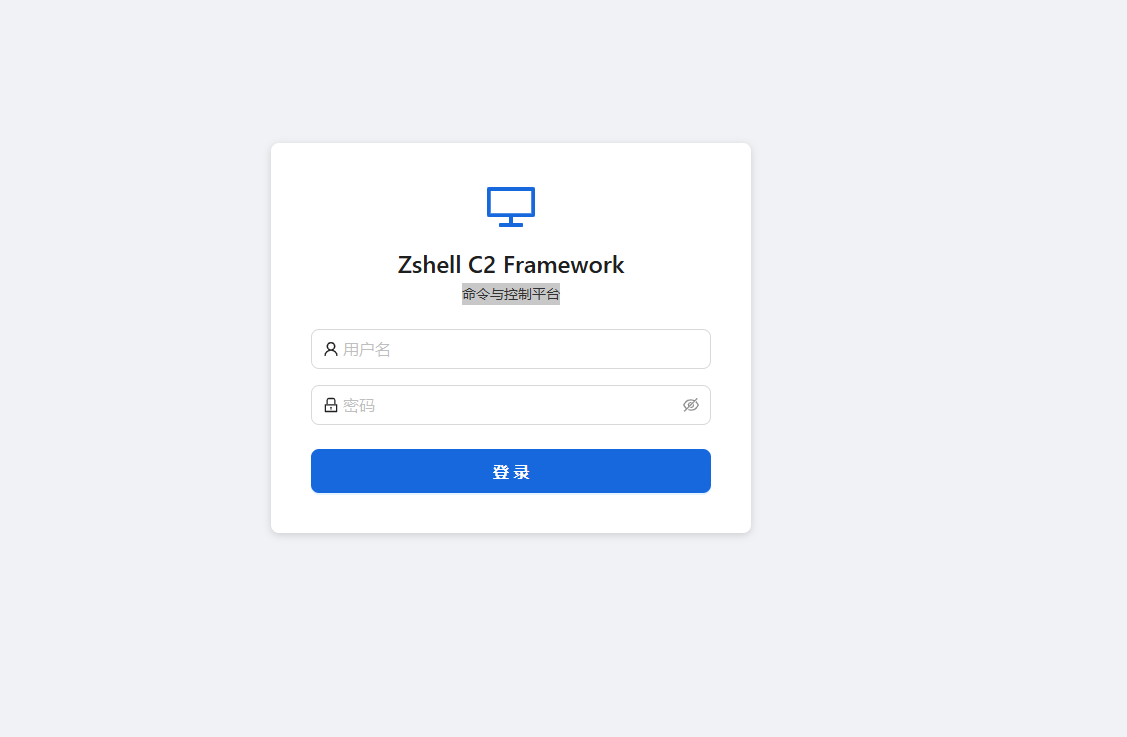
This appears to be a previously unknown C2 framework - I could not find any references to it elsewhere, nor its presence in any public Git repos. I did, however, notice some JavaScript leaked in its React frontend, which gives some insight into the C2’s capabilities.
Hosting IPs
-
38.127.8[.]151:8084
- ASN Number: 44259
- ASN Org: Ultahost, Inc
- Country: Singapore
-
38.207.181[.]132:8084
- ASN Number: 967
- ASN Org: VMISS Inc
- Country: Hong Kong
ZShell C2 - Frontend Code Analysis
1. Authentication & Session Management
const Ta = n0()(x2((e, t) => ({
  token: null,
  user: null,
  login: async (n, r) => {
    try {
      const o = await n7(n, r),
        { token: i, user: a } = o.data.data;
      return e({ token: i, user: a }), !0;
    } catch { return !1 }
  },
  logout: () => {
    e({ token: null, user: null });
    window.location.href = "/login";
  },
ZShell uses the Zustand library with the “persist middleware” function, storing the JWT token in localStorage under the key zshell-auth. The interceptor then injects this token into every API request:
$e.interceptors.request.use(e => {
  const t = localStorage.getItem("zshell-auth");
  if (t) try {
    const { state: n } = JSON.parse(t);
    n?.token && (e.headers.Authorization = `Bearer ${n.token}`)
  } catch {}
  return e;
});
A 401 response auto-redirects to /login, clearing stored credentials.
2. WebSocket - Real-time Beacon Events
i.onmessage = a => {
  try {
    const l = JSON.parse(a.data), s = l.type;
    if (s === "auth_result") {
      l.ok ? e({ connected: !0 })
            : (console.warn("[ws] auth failed:", l.message),
               Bc = !0, i.close());
      return;
    }
    const { handlers: u } = t(),
      d = u.get(s);
    d && d.forEach(m => m(l.data));
    const f = u.get("*");
    f && f.forEach(m => m(l));
  } catch {}
},
The WebSocket authenticates separately with the JWT token after connection. It uses a routing setup that maps specific events (like beacon_checkin) to their own handlers, while a wildcard * listener catches everything else in the background. If the connection drops, it’s programmed to try again every 10 seconds until it gets back online.
3. Payload Generator - AV Evasion Templates
genVariantRandom:  "Random (Recommended) - Randomly picks a different template each time",
genVariantWinINet: "WinINet - InternetOpenUrl + CreateThread",
genVariantWinHTTP: "WinHTTP - WinHttpOpenRequest + TimerQueue Callback",
genVariantSocket:  "Socket - Raw Winsock + Fiber Execution",
genVariantURLMon:  "URLMon - URLDownloadToCacheFile + EnumDesktopWindows Callback",
genVariantCertUtil:"CertUtil - URLDownloadToFile + QueueUserWorkItem Thread Pool",
genVariantNtApc:   "NtApc - HttpOpenRequest + NtQueueApcThread (NT Native APC Injection)",
There are six distinct stager templates, each using different Windows APIs for shellcode download and execution. The variety is deliberate - different API call patterns to evade signature-based detection. The NtApc variant is particularly notable, using native NT syscall-level APC injection rather than the more commonly detected Win32 equivalents.
4. PE Execution Methods
peForkAndRunNote: "Executes PE in a sacrificial process. Stable, supports all
  languages (C/C++/Go/Rust/.NET etc.). Beacon crash-isolated, output captured automatically.",

peInlineExecNote: "Loads PE directly into beacon process. No child process created,
  stealthier. Supports native PEs (C/C++/Go/Rust). Does NOT support .NET assemblies.
  3-layer exit protection (IAT patch + inline hook + VEH).",
Two execution modes directly comparable to Cobalt Strike’s approach:
- Fork & Run - spawns a sacrificial process, hollows it, injects and runs the PE. Safer, output is captured.
- Inline Execute - loads directly into the beacon process. No child process means less EDR telemetry, but more dangerous. The “3-layer exit protection” (IAT patch + inline hook + Vectored Exception Handler) provides multiple defense mechanisms in an attempt to prevent
ExitProcesscalls from killing the beacon.
5. PE Signing & Disguise
genSignSigThief:  "Signature Cloning (SigThief)",
genSignSelfSign:  "Self-Signed Certificate",
genSignCert:      "Real Certificate Signing",
genCloneRich:     "Rich Header Spoof (Disguise as MSVC build)",
Three signing approaches plus Rich Header spoofing. SigThief copies an Authenticode signature from a legitimate binary (a donor PE) onto the payload - the signature is technically invalid but many basic AV products won’t verify it cryptographically. Rich Header spoofing forges the compiler metadata embedded in PE headers to make the binary appear to have been built with a specific version of MSVC.
6. Persistence Methods
persistService:       "Service",
persistScheduledTask: "Scheduled Task",
persistRegistry:      "Registry",
persistCron:          "Cron",
persistDLLHijack:     "DLL Hijack",
persistSSHKey:        "SSH Key",
persistWMI:           "WMI",
persistStartup:       "Startup Folder",
Eight persistence mechanisms across Windows and Linux, covering the most common MITRE ATT&CK persistence techniques (T1543, T1053, T1547, T1546, T1574).
7. Shell Execution Methods & OPSEC Notes
shellBuiltinNote: "Pure Windows API - zero process creation, maximum stealth",
shellPpidNote:    "Parent PID spoofing - child appears under explorer.exe, breaks PID chain",
shellWmiNote:     "WMI Win32_Process.Create - child appears under wmiprvse.exe, breaks PID chain",
The UI explicitly labels each method with its OPSEC implications. PPID spoofing and WMI execution are classic techniques to break process lineage chains that EDRs use to correlate suspicious activity.
Unknown Android C2
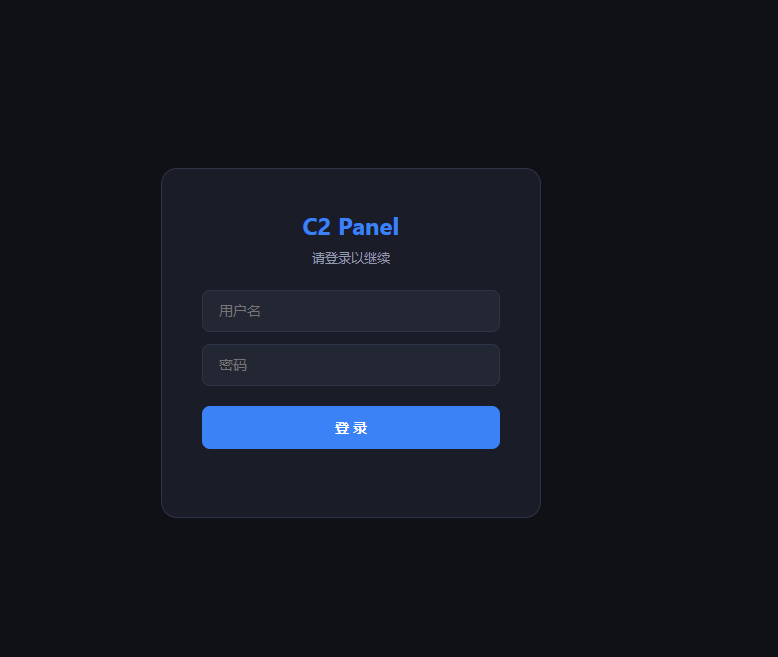
Also during hunting, I came across another unknown C2 panel. This one also leaked some of its features via JavaScript in the frontend. The code indicates the malware targets Android devices, with the key features outlined below.
Hosting IPs
-
192.229.87[.]230:80
-
ASN Number: 138995
-
ASN Org: Antbox Networks Limited
-
Country: China
-
192.229.87[.]227:443
-
ASN Number: 138995
-
ASN Org: Antbox Networks Limited
-
Country: China
-
DNS: huas1.vip
1. The “Skeleton Key”: Accessibility Service Exploitation
The core of the malware’s power lies in the acc (Accessibility) status. In Android, Accessibility Services can read screen content and perform gestures on behalf of the user.
// Filter logic prioritizing devices with Accessibility enabled
label: `<input type="checkbox" id="filterAcc" onchange="..."> 只看无障碍开`

// Device info extraction
acc: n.acc || !1, // Tracking if the 'Skeleton Key' is active
By tracking the acc status, the attacker knows which devices are ready for “clickless” theft. With Accessibility enabled, the malware can:
- Automatically grant itself further permissions
- Prevent its own uninstallation (
antiDel) - Log every keystroke
- Intercept 2FA codes directly from the screen before the user sees the notification
2. Automated Overlay Injection Engine
The most notable feature is the automation of phishing. Unlike older RATs that required an attacker to manually trigger an overlay, in this case it uses a “Config-and-Forget” system.
<div class="inj-card">
  <div class="app-name">Target App (e.g., Binance / Chase)</div>
  <label class="inj-toggle">
    <input type="checkbox" checked>
    <span class="slider"></span>
  </label>
</div>
<div class="desc">配置自动注入目标APP...每设备每APP仅一次</div>
How it works:
- Detection - The malware monitors the
topPkg(foreground application). - Match - If the victim opens an app that matches the “Inject List” (e.g., a banking or crypto app), the C2 triggers the injection.
- The Hijack - A fake UI is drawn over the real app. The user enters their credentials into the fake screen, which are instantly sent to the
msg-listin the panel. - One-and-Done - The “one time per app” logic is a stealth feature to avoid raising suspicion from repeated fake screens.
3. Stealth Operations: “Black Mode” & “Silent Shot”
It also includes commands specifically designed to hide parts of an automated bank transfer from the victim’s eyes.
| Command | Panel Action | Malicious Intent |
|---|---|---|
black / blackB | cmd('black') | Turns the screen black to hide unauthorised background actions |
silentShot | cmd('silentShot') | Captures a screenshot without triggering Android’s shutter sound or UI flash |
transparent | cmd('transparent') | Places an invisible layer over the screen to intercept all touch inputs |
If an attacker is using the Accessibility Service to move money out of a banking app, they will trigger Black Mode so the victim thinks their phone has just gone to sleep, while the malware completes the transaction in the background.
4. Financial Triage: Crypto & Lock Analytics
The panel is built to prioritise high-value targets - it organises victims by their financial potential.
// Wallet tracking logic
walletStr = (e.wallets && e.wallets.length > 0) ? e.wallets.join(",") : "-";

// Lock status tracking (Pattern vs PIN)
<td>${e.pwdStatus === "pattern" ? '✅九宫格' : e.pwdStatus === "pin" ? '✅PIN' : '⏳等待中'}</td>- Wallet Enumeration - The panel instantly shows which crypto wallets are installed (e.g., MetaMask, Trust Wallet), allowing the attacker to prioritise these victims for manual theft.
- Unlock Intelligence - By knowing whether the user uses a 九宫格 (Pattern) or a PIN, the attacker knows which gesture injection or keylogging overlay to deploy to steal the device’s master password.
5. Multi-Tenant “Criminal SaaS” Architecture
The panel functions as a professional business platform, allowing a developer to sell access to agents, who then sell to clients.
// Hierarchical Role Mapping
const roleMap = { admin: "管理员", agent: "代理", client: "客户" };

// Bulk Transfer System
const t = await apiFetch("/api/transfer", {
    method: "POST",
    body: JSON.stringify({ deviceIds: Array.from(selectedDeviceIds), targetUser: e })
});
PlayPraetor
The features the C2 panel leaks closely resemble those of PlayPraetor, a C2 framework first reported on in 2025. The panel itself, as well as some of its leaked features, suggest either a variant or updated version of PlayPraetor. The presence of emojis in the code suggests code development using an LLM.

C2 Hunter
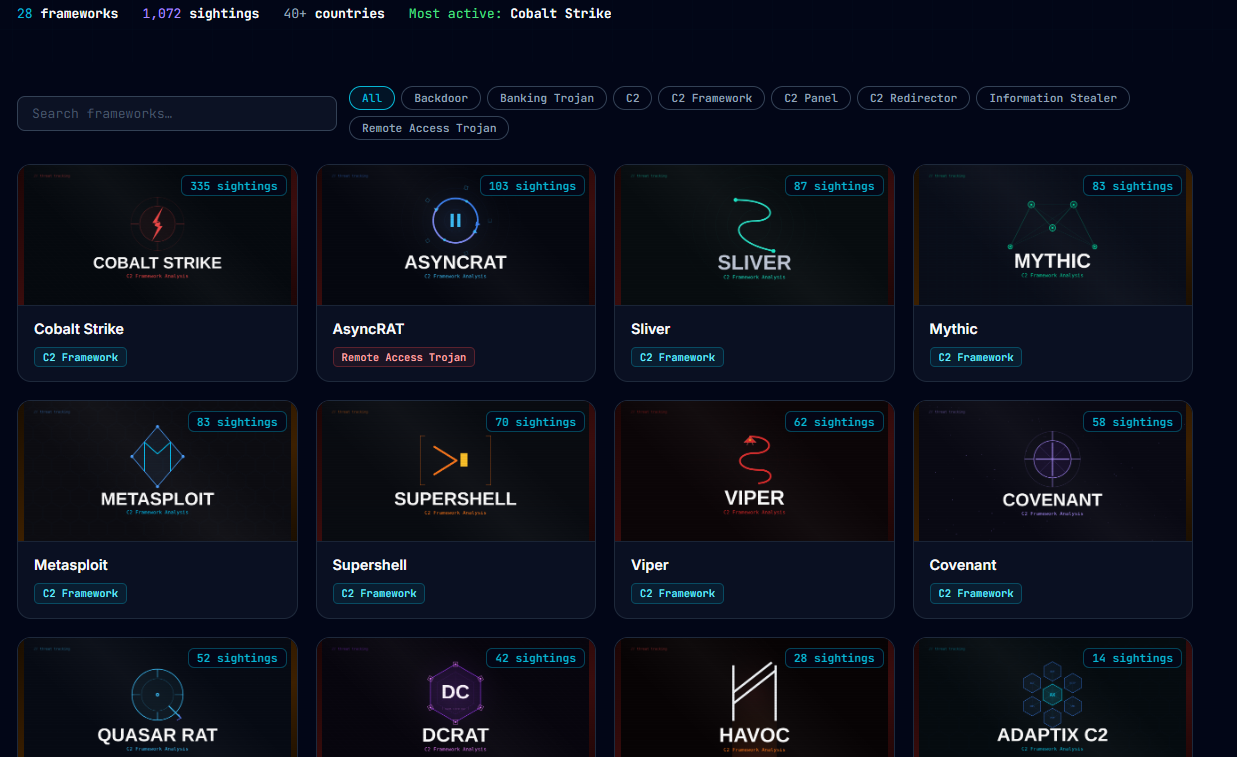
After hunting for new C2 IPs and frameworks in the wild, I thought I might as well put the results and findings to good use. So I put together C2 Hunter, which tracks and displays a whole bunch of different C2 frameworks and infostealers. An example of C2 Hunter’s tracked frameworks is shown below.
All IOCs also get pushed to a public Git Repo, where they can be pulled and used in an MDE custom alert, syntax for this below:
let C2IOCs = (externaldata(IP:string, Framework:string, Port:int, Country:string, PublishedAt:string)
    [@"https://raw.githubusercontent.com/newtonpaul-hunting/c2-iocs/main/c2_sightings.csv"]
    with (ignoreFirstRecord=true, format="csv"));
DeviceNetworkEvents
| where ActionType == "ConnectionSuccess"
| where RemoteIP in ((C2IOCs | project IP))
| join kind=leftouter (C2IOCs) on $left.RemoteIP == $right.IP
| project
    Timestamp,
    DeviceName,
    DeviceId,
    LocalIP,
    RemoteIP,
    RemotePort,
    Framework,
    Country,
    PublishedAt,
    InitiatingProcessFileName,
    InitiatingProcessCommandLine,
    InitiatingProcessParentFileName
| order by Timestamp desc
More to come…
I’ve only covered a couple of C2 frameworks I came across in this blog, I’ve got a bunch more I’m still working through, that’ll be pushed to C2 Hunter when I’m done with the analysis. Until next time!